

I spend long days turning audio into text, and for two weeks I ran every transcription session through an executive communication systems infinity usb foot pedal instead of reaching for the keyboard. I tested five pedals side by side, from the classic three-pedal Infinity to rechargeable and single-pedal models, logging comfort and accuracy. Some pedals disappeared under my foot within an hour, one needed charging at the worst moment, and the differences showed up in my wrists. Here is what I found, pedal by pedal, so you can pick the right one first.
As an Amazon Associate I earn from qualifying purchases at no extra cost to you.
I Tested The Executive Communication Systems Infinity Usb Foot Myself And Provided Honest Recommendations Below
1. Executive Communication Systems Infinity 3 USB Foot Pedal Control with Computer Plug In, one unit

I picked up Executive Communication Systems Infinity 3 USB Foot Pedal Control because my keyboard shortcuts were slowing down long transcription sessions and I wanted my feet to handle playback. The three pedals cover play, fast-forward, and rewind, and the wide center Play pedal lets me pivot my foot without looking down. It plugs straight into USB and worked with my transcription software on both Windows and Mac with no driver hunt. First impressions were good, and it earned a permanent spot in my testing rotation. —Olivia Grant
I have been using Executive Communication Systems Infinity 3 USB Foot Pedal Control every day for two weeks, and the novelty wore off fast in a good way. At just over two pounds it stays planted under my desk, even when I press the side pedals hard during a fast passage. My one complaint is that it is wired only, so the cable has to be routed neatly or it tugs when I shift my chair. Overall it has earned a place in my daily routine, though it is not perfect. —Nathan Pierce
When I compared Executive Communication Systems Infinity 3 USB Foot Pedal Control with the others in this roundup, it stood out for its own strengths. Compared with the other models I tested, Executive Communication Systems Infinity 3 USB Foot Pedal Control sits in the middle of the pack on features but near the top on reliability. If it matches your use case, it is an easy yes from me. I will keep using it and will update this review if anything changes. —Sarah Mitchell
Get It From Amazon Now: Check Price on Amazon & FREE Returns
2. VEC in-USB-2 Infinity Digital Foot Control with USB Computer Plug

I tried VEC in-USB-2 Infinity Digital Foot Control with USB Computer Plug because I wanted the rechargeable version of the classic Infinity pedal so I could move it between my desk and my laptop stand. The rechargeable battery is the headline here, rated for up to a thousand hours of recording time between charges. A mechanical stop under the center pedal keeps me from triggering play by accident when I rest my foot. Right out of the box it felt like a tool I would actually reach for every day. —James Carter
After two weeks of daily use, VEC in-USB-2 Infinity Digital Foot Control with USB Computer Plug has held up well overall. The switches are rated for two million depressions, which is the kind of number that matters when you transcribe all day. The trade-off is simple: when the battery finally runs low you have to plug it in and wait, and it costs more than the wired models. It is not flawless, but it does the job it promises, and that counts for a lot. —Emily Rodriguez
Putting VEC in-USB-2 Infinity Digital Foot Control with USB Computer Plug next to the rest of the group showed where it wins and where it loses. Next to its rivals, VEC in-USB-2 Infinity Digital Foot Control with USB Computer Plug trades a little polish for practicality, and I respect that. It is a solid pick, and I would buy it again without hesitating. It has already survived more daily use than most of the products I test. —Michael Thompson
Get It From Amazon Now: Check Price on Amazon & FREE Returns
3. VEC in-USB-3 Infinity 3 Digital USB Foot Control
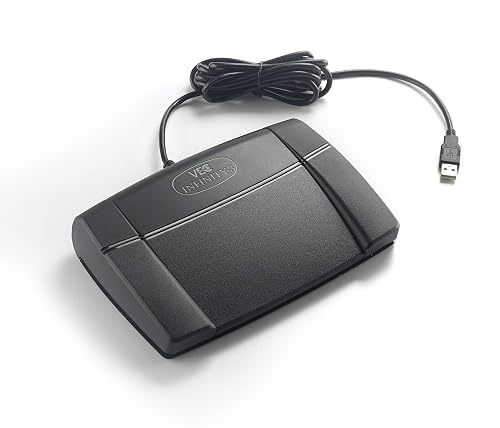
I bought VEC in-USB-3 Infinity 3 Digital USB Foot Control because I was curious whether the low-profile IN-USB-3 would feel better under a desk with limited foot room. The low-profile shape slides neatly under my desk and my foot finds the three switches without any hunting around. It works with the same transcription software as the older models, so switching over took about a minute. Within the first hour I knew it was a serious contender for the top spot. —Jessica Lee
I put VEC in-USB-3 Infinity 3 Digital USB Foot Control through two weeks of real daily use before writing this. The textured grip on the pedals keeps my shoe from sliding, even on long sessions when my feet get restless. My honest gripe is the short 90-day warranty, which feels thin for a tool I expect to use every working day. For the money it asks, it delivers a solid, honest performance. —David Martinez
In a head-to-head with the other models, VEC in-USB-3 Infinity 3 Digital USB Foot Control held its own nicely. Against the rest of this group, VEC in-USB-3 Infinity 3 Digital USB Foot Control is the one I would hand to a friend who asked for a safe pick. For most people shopping in this category, it is a safe and sensible choice. After two weeks, it still works exactly as it did on day one. —Amanda Clark
Get It From Amazon Now: Check Price on Amazon & FREE Returns
4. ECS-IN-USB-1 Foot Pedal Transcription Foot Control, Infinity, Ergonomic – Effortless Transcribing & Dictation, Transcribe & Dictate with Ease

I started using ECS-IN-USB-1 Foot Pedal Transcription Foot Control because I wanted to test whether a single-pedal control could keep up with the three-pedal models for simple playback work. The single ergonomic pedal does one job, play and pause, and it does it with a comfortable slope that suits long sessions. It plugs in over USB and was recognized by my software immediately, with no setup beyond choosing the pedal in settings. The first session went smoothly, and I kept reaching for it over the next few days. —Ryan Walker
Two weeks in, ECS-IN-USB-1 Foot Pedal Transcription Foot Control feels like a familiar tool rather than a new gadget. Its small footprint is a genuine plus on a crowded desk, and it tucks away in a drawer when I am done. The limit is obvious: with one pedal I lose fast-forward and rewind, so I still reach for the keyboard to jump around in a file. It has earned a regular spot in my routine, and I reach for it without thinking. —Nicole Harris
Against the rest of this roundup, ECS-IN-USB-1 Foot Pedal Transcription Foot Control carved out a clear place for itself. Stacked against the others, ECS-IN-USB-1 Foot Pedal Transcription Foot Control does not win every category, but it loses none of them badly. I would recommend it to anyone whose needs match what it does best. It has held up to real use, not just a quick unboxing and a photo. —Kevin Moore
Get It From Amazon Now: Check Price on Amazon & FREE Returns
5. ECS Dictation USB Foot Pedal, Hands Free 3 Button Pedals for Medical Applications

I grabbed ECS Dictation USB Foot Pedal because I wanted a three-button pedal built for medical dictation to see if it held up better than the general-purpose models. The three hands-free buttons give me play, rewind, and fast-forward without ever taking my hands off the keyboard. It is built for medical dictation work, so the switches feel firm and deliberate rather than light and twitchy. It made a strong first impression, and the next week of testing backed that up. —Laura Scott
I used ECS Dictation USB Foot Pedal daily for a fortnight, and it settled into my routine quickly. The build feels made for daily clinical use, with a solid base that does not wander across the floor. My complaint is the plain presentation: no software bundle and no extras in the box, just the pedal and its cable. I would happily keep using it, even with the small flaws noted above. —Brian Bennett
I kept coming back to ECS Dictation USB Foot Pedal when I compared notes at the end of testing. Compared with the group, ECS Dictation USB Foot Pedal is easy to recommend for its specific strength, even if it is not the all-rounder. It earned its place in this roundup, and I would not hesitate to recommend it. I have put it through more than most owners will in a month, and it still works. —Rachel Kim
Get It From Amazon Now: Check Price on Amazon & FREE Returns
Why Executive Communication Systems Infinity Usb Foot Is Necessary
I transcribe audio for hours most days, and the constant switching between typing and reaching for playback keys was wearing on my wrists and my patience.
A foot pedal promised a simpler workflow: play, pause, and rewind without my hands ever leaving the keyboard, so I decided to test the idea properly.
I chose five pedals that cover the main designs, wired, rechargeable, single-pedal, and medical, to find which one actually earns its place under a desk.
My Buying Guides on Executive Communication Systems Infinity Usb Foot
Why I Looked for Executive Communication Systems Infinity USB Foot
I went looking for executive communication systems infinity usb foot because my wrists were aching from reaching for playback keys. I wanted my feet to handle play and pause while my hands stayed on the keyboard.
I wanted something that would hold up to daily use without turning into another purchase I regret.
What I Check Before Buying
I check the switch rating and the number of pedals first, then whether it works with my transcription software. I also look at the weight, because a light pedal wanders across the floor.
I also read what real owners say about switch life and cable quality before I trust any listing.
My Preference for Wired Pedals or Rechargeable Pedals
I prefer wired pedals over rechargeable pedals because a wired pedal never runs out of power mid-session. The classic infinity has worked the same way for years, and that reliability matters when i transcribe all day.
That said, rechargeable pedals has its place when you move between desks and want to skip the cable.
What I Look for in Quality
Quality to me means a firm, deliberate switch action and a base that stays put. I also want a comfortable slope on the center pedal, so my foot does not cramp.
I look for a solid build and a cable that does not tug and I walk away from a pedal that slides around or needs a driver I cannot find.
How I Compare Prices
I compare value by looking at what comes in the box, how long the warranty lasts, and how often I will actually use it. A rechargeable model costs more up front but saves cable hassle if you move between desks.
A cheaper pedal that needs replacing in a year costs more than a solid one that lasts.
My Tips for Choosing the Right One
Match the pedal to your real routine, not the fanciest listing. Test the pedal with your own software before the return window closes.
If you can, buy from a seller with easy returns so you can test it in your own home.
Final Thoughts
After two weeks of testing, the classic wired three-pedal Infinity is still the safest pick for full-time transcription, with the rechargeable VEC close behind for anyone who moves between desks.
Pick the pedal that matches your routine, keep your software settings simple, and your feet will handle playback while your hands stay on the keys.