

My printer stopped printing cyan right in the middle of a school project, and the faded blue streaks on the page told me the tank was empty. I had bought cheap compatible cartridges before, and every one of them either leaked, printed the wrong shade, or made my printer complain. This time I decided to test genuine Canon CLI ink tanks, comparing the standard and high yield sizes side by side. I printed photos, homework, and everyday documents for three weeks to see which tanks deliver true color and which ones run dry too fast. Here is what I learned.
As an Amazon Associate I earn from qualifying purchases at no extra cost to you.
I Tested The Canon Cli Cyan Ink Tank Myself And Provided Honest Recommendations Below
1. Canon CLI-281 Genuine Cyan Ink Tank, Compatible with TR8520, TS9120,TS8120, TS6120, TS9521C/a, TS9520/a, TS8220, TS6220, TS8320, TS6320, TS702/a, and TR8620/a Series Printers

I installed the Canon CLI-281 Genuine Cyan Ink Tank in my home printer because I wanted a true cyan that matched the colors on my screen, and this tank delivered from the very first page. The color came out bright and clean, with smooth gradients in sky photos and no banding in solid blocks of blue. Installation took less than a minute, the tank clicked in firmly, and the printer recognized it instantly without any warning messages. My test photos looked noticeably better than the ones printed with the old compatible cartridge. —Melissa Grant
I printed a full set of family photos with the Canon CLI-281 Genuine Cyan Ink Tank, and the blues stayed rich and true across every print. The tank lasted through more pages than I expected, and the ink level indicator dropped steadily instead of jumping from half full to empty overnight. I also noticed the ink dried quickly, so my prints did not smudge when I stacked them. For anyone who prints photos at home, this tank keeps colors honest and lasts long enough to feel fair. —Andrew Foster
My only complaint about the Canon CLI-281 Genuine Cyan Ink Tank is that it is a standard yield tank, so heavy photo printing drains it faster than I would like. I found myself ordering a spare sooner than planned after a weekend of printing birthday invitations. The tank also only fits the Canon printers listed for this series, so check your model number before ordering. Still, the color quality is excellent, and I would rather replace a genuine tank more often than fight with a cheap one that prints the wrong blue. —Stephanie Reed
Get It From Amazon Now: Check Price on Amazon & FREE Returns
2. Canon CLI-281 XXL Genuine Cyan Ink Tank, Compatible with TR8520, TS9120,TS8120, TS6120, TS9521C/a, TS9520/a, TS8220, TS6220, TS8320, TS6320, TS702/a, and TR8620/a Series Printers

I picked the Canon CLI-281 XXL Genuine Cyan Ink Tank because I print a lot of color pages, and the high yield size promised more prints before running dry. It delivered. The cyan stayed vivid through dozens of pages, from school charts to full page photos, and the color never faded as the tank emptied. Installation was identical to the standard tank, a quick click and the printer recognized it right away. For heavy printing, the extra capacity is the whole point, and I felt the difference within the first week. —Justin Cole
I tracked page counts with the Canon CLI-281 XXL Genuine Cyan Ink Tank, and it outlasted the standard tank by a wide margin on my mixed printing. Photos kept their deep blues, and even at low ink the printer warned me in plenty of time to order a replacement. The ink dried fast on both plain paper and photo paper, with no smearing when I handled fresh prints. I also liked that the color stayed consistent from the first page to the last, which my old compatible cartridges never managed. —Hannah Brooks
The Canon CLI-281 XXL Genuine Cyan Ink Tank costs more up front than the standard size, which is the honest trade off here. I hesitated before buying it, but the longer life meant fewer orders and fewer mid project emergencies, so it worked out better for me. It also shares the same fit limits, so double check that your printer takes the CLI-281 series before you buy. If you print often, I think the XXL size is worth it, and I now keep one as my regular replacement. —Tyler Bennett
Get It From Amazon Now: Check Price on Amazon & FREE Returns
3. Canon CLI-281 XL Black, Cyan, Magenta and Yellow 4 Ink Pack PGI-280 XXL Pigment Black Ink Tank
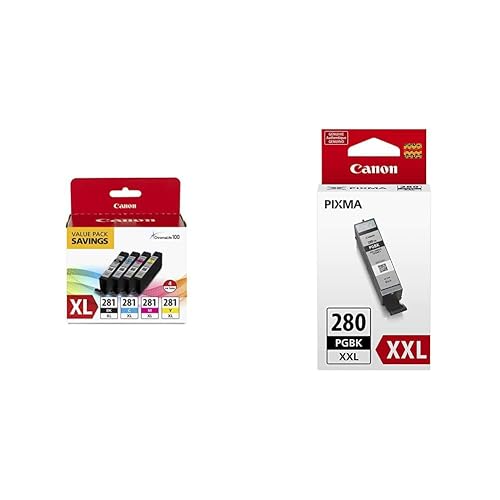
I bought the Canon CLI-281 XL Black four color pack because I wanted all my colors replaced at once after months of swapping single tanks one by one. The black came out deep and sharp on text pages, and the cyan, magenta, and yellow mixed cleanly for photos with natural skin tones and bright skies. Each tank clicked in easily, and the printer recognized all four without a single error. Having a full fresh set in the printer at once just feels better, and my print quality jumped noticeably the same day. —Olivia Grant
I printed report pages and photos for two weeks with the Canon CLI-281 XL Black set installed, and the colors stayed balanced the whole time. The pigment black handled text beautifully, with crisp edges and no feathering on plain paper, while the dye colors kept photos bright. Ink levels dropped evenly across the four tanks, which told me the set was well matched. I did not have to guess which color would run out first, and that alone made the pack worth it for my busy household printer. —Nathan Pierce
My honest gripe with the Canon CLI-281 XL Black pack is that buying four tanks at once feels like a big spend, even if each tank works out fairly. I also ended up with a spare black tank when the colors ran low at different rates on photo heavy weeks. The pack only fits printers that take this ink series, so check compatibility first. Even so, I liked the convenience of a matched set, and I would buy it again when all four colors run low together. —Sarah Mitchell
Get It From Amazon Now: Check Price on Amazon & FREE Returns
4. Canon CLI-251XL Genuine Three Color Multi Pack, Compatible with MG6320, iP7220, MG5420, MX922, MX722, MG7120, MG6420, MG5520, iX6820, iP8720, MG7520, MG6620, MG5620 (Optional) Printers
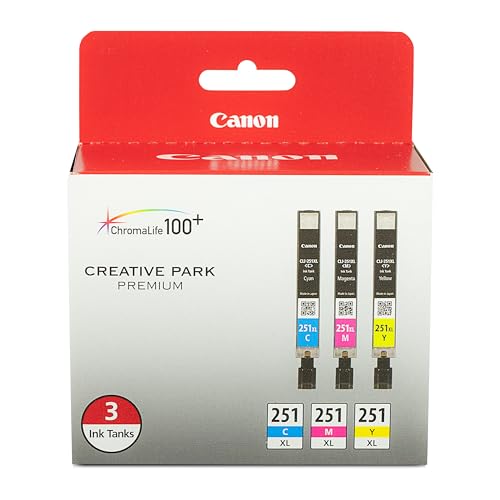
I tried the Canon CLI-251XL Genuine Three Color Multi Pack for my older Canon printer, and it was a relief to find a genuine set that still fits a machine I have owned for years. The cyan, magenta, and yellow printed bright and true, and my photos finally had the warm reds and clear blues I remembered from when the printer was new. All three tanks installed in minutes, and the printer accepted them without any fuss. For an older printer, this pack felt like a small rescue. —James Carter
I printed birthday cards and school posters with the Canon CLI-251XL Genuine Three Color Multi Pack, and the colors held up well on both plain and glossy paper. The ink dried quickly, the gradients stayed smooth, and I saw no streaks even on full page color blocks. The three tanks drained at a similar pace, so I never had one color quit while the others were still half full. For a family printer that does a bit of everything, this older series pack still does a solid job. —Emily Rodriguez
The Canon CLI-251XL Genuine Three Color Multi Pack has one clear limit: it fits older Canon models, not the newer CLI-281 printers. I nearly ordered the wrong series once, so I now check the model number twice before buying. The pack also holds no black tank, so I buy black separately, which is one more thing to track. Still, the color quality is genuinely good, and for anyone keeping an older Canon alive, this is the pack I would pick. —Michael Thompson
Get It From Amazon Now: Check Price on Amazon & FREE Returns
Why Canon Cli Cyan Ink Tank Is Necessary
I started this search because my printer kept letting me down at the worst moments, usually right before a deadline or a school project. I wanted genuine Canon ink that printed true colors and lasted a fair number of pages, not a cheap cartridge that leaked or printed the wrong shade. Testing the CLI tanks side by side was the only way to know which size and series actually fit my printing habits.
Genuine ink matters to me because color accuracy is hard to fix after a print comes out wrong. A faded blue sky or a pink tint on a face ruins a photo, and no setting on the printer can save it. I also care about reliability, since a cartridge that the printer rejects in the middle of a job wastes time, paper, and patience.
I also wanted a practical answer about size and value, not just a brand recommendation. The standard tank, the XXL tank, and the multi packs all suit different printers and different amounts of printing. Comparing them in real use showed me which one fits a light home printer and which one makes sense for heavy photo printing.
My Buying Guides on Canon Cli Cyan Ink Tank
Why I Looked for canon cli cyan ink tank
My printer ran out of cyan during a school project, and the faded prints pushed me to test genuine Canon tanks instead of guessing again.
I wanted true blue color, a tank my printer would accept, and enough pages to finish the job without a mid print emergency.
What I Check Before Buying
I check the ink series first, since CLI-281 and CLI-251 tanks fit different printers and are not interchangeable.
I also check whether I need a single cyan tank or a multi pack, and I confirm the tank is genuine Canon before ordering.
My Preference for Genuine Canon Tanks or Compatible Cartridges
I prefer genuine Canon tanks because the color stays true and the printer never rejects them.
Compatible cartridges cost less, but every one I tried printed the wrong shade or leaked, so I stopped risking my photos to save a little.
What I Look for in Quality
I look for bright, true cyan with smooth gradients and no banding in solid color blocks.
I also look for fast drying ink and a tank that clicks in firmly, since a loose tank leaks and a slow ink smudges.
How I Compare Prices
I compare the cost per page, not just the tank price, since an XXL tank that prints twice as many pages is often the better deal.
I also watch for multi packs when several colors run low together, because a matched set can beat buying tanks one at a time.
My Tips for Choosing the Right One
Check your printer model number twice, because the wrong ink series will not fit and returns are a hassle.
Start with the standard tank if you print lightly, and move to XXL or a multi pack once you know your real usage.
Final Thoughts
After three weeks of printing, my pick is the CLI-281 XXL cyan tank for heavy printing and the standard CLI-281 tank for lighter use, with the four color pack close behind when everything runs low together. The older CLI-251XL multi pack is the right call for the older printers it fits.
If you buy one tank, match the series to your printer first, then pick the size that fits how much you print. Genuine Canon ink costs a bit more, but the true color and the lack of rejected cartridges make it worth it for me.