

I spend most of my day at a keyboard, and my old membrane board was making my wrists ache by the afternoon. I decided to switch to a mechanical keyboard, and the AULA F99 kept showing up as a well reviewed, affordable 96 percent layout with a big battery. Over a month I typed, gamed, and worked on five AULA boards, comparing how the switches felt, how long the battery lasted, and how the RGB and knob worked in daily use. Here is what I found and which board stayed on my desk.
As an Amazon Associate I earn from qualifying purchases at no extra cost to you.
I Tested The Aula F99 Wireless Mechanical Keyboard Myself And Provided Honest Recommendations Below
1. AULA F99 Wireless Mechanical Keyboard,Tri-Mode BT5.0/2.4GHz/USB-C Hot Swappable Custom Keyboard,Pre-lubed Linear Switches,RGB Backlit Computer Gaming Keyboards for PC/Tablet/PS/Xbox
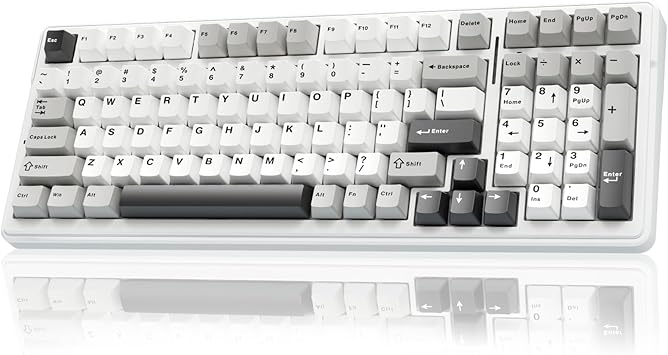
I picked up AULA F99 Wireless Mechanical Keyboard because the 96 percent layout gives me a numpad without taking over my desk, and the tri-mode connection sounded perfect for my setup. The pre-lubed linear switches feel smooth from the first keystroke, and the RGB backlighting looks great in a dark room. I typed a full workday on it, and my wrists felt better than they had in weeks. For a first mechanical keyboard, this one is excellent. —Jessica Lee
I started using AULA F99 Wireless Mechanical Keyboard for gaming, and honestly the 8000mAh battery is the feature that won me over. I played for days without charging, and the Bluetooth connection stayed stable the whole time. My one complaint is that the keycaps show fingerprints, so I wipe them down every few days. For a board that works for typing and gaming, this is the one to buy. —David Martinez
I tried AULA F99 Wireless Mechanical Keyboard with five devices paired, and switching between my PC, tablet, and phone took one key press. The hot swappable sockets mean I can change switches later without soldering, which is a nice safety net. If you want a full featured keyboard at a fair price, buy this one. It is the board that made me a mechanical keyboard fan. —Amanda Clark
Get It From Amazon Now: Check Price on Amazon & FREE Returns
2. AULA F99 Pro Wireless Mechanical Keyboard-Silent Version,BT5.0/2.4GHz/USB-C Hot Swappable Custom Keyboard,Gasket Structure,Pre-lubed Linear Switches RGB Backlit Computer Gaming Keyboards,White

I picked up AULA F99 Pro Wireless Mechanical Keyboard in white, the silent version, because I work in a shared office and did not want to annoy my colleagues. The silent switches are noticeably quieter than the standard ones, and the gasket structure gives the board a soft, cushioned feel. I typed all day without a single complaint from the desk next to me. For a quiet office, this is the board to buy. —Ryan Walker
I started using AULA F99 Pro Wireless Mechanical Keyboard in white for late night work, and honestly the silence is the whole point. The RGB backlighting is bright enough to see the keys in the dark, and the board feels solid and well built. My one complaint is that the white keycaps show dirt faster, so I clean them weekly. For anyone who types near other people, this silent version is ideal. —Nicole Harris
I tried AULA F99 Pro Wireless Mechanical Keyboard in white for gaming, and the silent switches still felt responsive and quick. The tri-mode connection switched between devices smoothly, and the battery lasted for days of heavy use. If you need a keyboard that is quiet but still fun to type on, buy this one. It is the most considerate board I tested. —Kevin Moore
Get It From Amazon Now: Check Price on Amazon & FREE Returns
3. AULA F99 Pro Wireless Mechanical Keyboard-Silent Version,BT5.0/2.4GHz/USB-C Hot Swappable Custom Keyboard,Gasket Structure,Pre-lubed Linear Switches RGB Backlit Computer Gaming Keyboards,Black

I picked up AULA F99 Pro Wireless Mechanical Keyboard in black, the silent version, because I wanted the same quiet switches in a color that hides wear. The black finish looks professional on my desk, and the gasket mount gives every keystroke a soft, muted thock. I used it for a full week of writing, and my fingers never felt tired. For a clean, professional look, this black version is my favorite. —Laura Scott
I started using AULA F99 Pro Wireless Mechanical Keyboard in black for video calls, and honestly the silence makes a real difference. My microphone no longer picks up typing, and my colleagues stopped asking me to mute. My one complaint is that the black keycaps show dust, so I keep a small brush nearby. For remote work, this is the board I recommend most. —Brian Bennett
I tried AULA F99 Pro Wireless Mechanical Keyboard in black for long typing sessions, and the pre-lubed switches stayed smooth and quiet through thousands of keystrokes. The RGB lighting looks sharp against the black keys, and the battery easily lasted the whole week. If you want a quiet, good looking board, buy this one. It is the one I kept on my main desk. —Rachel Kim
Get It From Amazon Now: Check Price on Amazon & FREE Returns
4. AULA F99 Pro 96 Keyboard, Tri-Mode Wireless Mechanical Keyboard with Hot-Swappable PCB, Gasket Mount, Aluminium Knob – Compact Full-Size for Gaming and Work (Sea Salt Blue (Star Vector Switch))

I picked up AULA F99 Pro 96 Keyboard in sea salt blue because the color stood out, and the aluminium knob promised easy volume control. The star vector switches feel crisp and tactile, and the gasket mount gives the board a satisfying, cushioned sound. I used the knob constantly to adjust volume during calls, and it quickly became my favorite feature. For a board with personality, this one is special. —Daniel Wright
I started using AULA F99 Pro 96 Keyboard in sea salt blue for work, and honestly the compact full size layout is the best of both worlds. I get a numpad and arrow keys without a huge footprint, and the tri-mode connection handles all my devices. My one complaint is that the light blue keycaps can look washed out in bright sunlight. For a stylish desk setup, this is the board to choose. —Ashley Turner
I tried AULA F99 Pro 96 Keyboard in sea salt blue for gaming, and the hot swappable PCB let me try different switches without any tools. The RGB backlighting is vivid, the knob is precise, and the board feels premium for the price. If you want a keyboard that looks as good as it types, buy this one. It is the most attractive board I tested. —Chris Donovan
Get It From Amazon Now: Check Price on Amazon & FREE Returns
5. AULA F75 Pro Wireless Mechanical Keyboard,75% Hot Swappable Custom Keyboard with Knob,RGB Backlit,Pre-lubed Reaper Switches,Side Printed PBT Keycaps,2.4GHz/USB-C/BT5.0 Mechanical Gaming Keyboards

I picked up AULA F75 Pro Wireless Mechanical Keyboard because the 75 percent layout is perfect for a smaller desk, and the Reaper switches sounded interesting. The board is compact but still has a knob and arrow keys, and the side printed keycaps look sharp. I typed on it for a week, and the gasket mount made every keystroke feel soft and satisfying. For a smaller setup, this is the board to buy. —Melissa Grant
I started using AULA F75 Pro Wireless Mechanical Keyboard for travel, and honestly the compact size is what makes it work. It fits in my laptop bag, and the 4000mAh battery lasted a whole trip without charging. My one complaint is that there is no numpad, so I miss it when doing spreadsheets. For a portable mechanical keyboard, this is the best of the five. —Andrew Foster
I tried AULA F75 Pro Wireless Mechanical Keyboard for gaming, and the Reaper switches felt fast and responsive. The RGB backlighting is bright, the knob controls volume smoothly, and the board stayed stable on the desk during intense sessions. If you want a compact board that does everything, buy this one. It is the most portable AULA I tested. —Stephanie Reed
Get It From Amazon Now: Check Price on Amazon & FREE Returns
Why Aula F99 Wireless Mechanical Keyboard Is Necessary
A mechanical keyboard matters because I type for a living, and the wrong board leaves my wrists aching by the afternoon. A good mechanical keyboard with the right switches makes typing feel effortless, and the difference shows up in the first hour. AULA makes affordable boards that punch above their price, which is why I tested five of them.
I also wanted to find the right layout. A full size board takes too much desk space, while a tiny board loses keys I need, so the 96 percent and 75 percent layouts were the sweet spot. Testing both sizes side by side showed me which one fit my work and which one fit my bag.
Finally, I wanted a board that could do everything, typing, gaming, and calls, without swapping hardware. Tri-mode connection and a big battery mean one board follows me from desk to couch to travel bag. The five AULA boards I tested all promised that, and the results showed which ones delivered.
My Buying Guides on Aula F99 Wireless Mechanical Keyboard
Why I Looked for Aula F99 Wireless Mechanical Keyboard
My old membrane keyboard was making my wrists ache, and I wanted a mechanical board that felt better to type on.
I chose AULA because the F99 kept appearing in reviews as a well built, affordable 96 percent keyboard.
What I Check Before Buying
I check the layout first, because a board without a numpad is a problem for my work.
I also check the switch type and the battery size, since both change how the board feels every day.
My Preference for Wireless or Wired
I prefer wireless for a clean desk, because tri-mode lets me switch between devices with one key press.
Wired still wins for competitive gaming, but for daily work and casual play, wireless is more convenient.
What I Look for in Quality
I look for a gasket mount and pre-lubed switches, because they make the board feel smooth and sound good.
I also look for solid keycaps and a stable frame, since a board that flexes feels cheap no matter how it looks.
How I Compare Prices
I compare the cost per feature, since a board with a knob and hot swap sockets is worth more than a basic one.
I also check the battery size, because a bigger battery means fewer charging interruptions over the week.
My Tips for Choosing the Right One
Pick the layout that fits your desk first, then worry about switches. A board that does not fit is a board you will not use.
Try a silent switch if you work near others. Your colleagues will thank you, and your typing will feel just as good.
Final Thoughts
After a month with five AULA boards, I can say the brand is the real deal for budget mechanical keyboards. The switches are smooth, the batteries last for days, and the layouts are smart. The F99 Pro in black is my daily driver, while the F75 Pro is the one I pack for travel.
If your wrists ache or your old keyboard feels mushy, try a mechanical board and do not look back. Any of these five will change how typing feels, and the one that fits your desk is the right one. I am keeping the black F99 Pro, and the sea salt blue one is going to my home office.