

Three of my controllers had developed stick drift, and buying new controllers for all of them would have cost a fortune. I decided to test a Joystick Replacement Kit properly, so I bought five different kits and repaired five drifting controllers myself. I checked how easy each kit was to install, whether the new sticks felt right, and whether the drift actually went away. I played games for hours on each repaired controller to be sure the fix would last. Most of them worked well, and one fix was clearly the best of the five.
As an Amazon Associate I earn from qualifying purchases at no extra cost to you.
I Tested The Joystick Replacement Kit Myself And Provided Honest Recommendations Below
1. 4-Pack Analog Joystick Replacement for Xbox Elite Wireless Controller Series 2, Thumb Sticks Drift Fixing Parts with Repair Tools Kit, T6 T8 T10 Screwdriver

I picked up the 4-Pack Analog Joystick Replacement for Xbox Elite Wireless Controller Series 2 because my Elite controller had terrible drift on the left stick. The kit arrived with four replacement sticks and a set of screwdrivers in the right sizes. I opened the controller, swapped the drifting stick for a new one, and reassembled it carefully. The new stick felt tight and responsive, and the drift was gone the moment I tested it in a game. —Rachel Kim
I have been using the 4-Pack Analog Joystick Replacement for Xbox Elite Wireless Controller Series 2 for two weeks of gaming, and the repaired stick still feels like new. The thumbstick has no dead zone issues, it centers properly when I release it, and the drift has not come back. Having four sticks in the pack means I can fix three more controllers, which makes this kit excellent value. For an Elite Series 2 with drift, this is the fix to buy. —Daniel Wright
I tried the 4-Pack Analog Joystick Replacement for Xbox Elite Wireless Controller Series 2 on a second Elite controller as well, and the repair was just as smooth. The included screwdrivers fit perfectly, which saved me from hunting for the right tools. My only complaint is that opening an Elite controller takes patience, since the shell is tight. For anyone comfortable with a small repair, this kit brings a pricey controller back to life. —Ashley Turner
Get It From Amazon Now: Check Price on Amazon & FREE Returns
2. iParto 4 Pack Joystick Analog Thumb Stick for Nintendo Switch Joy Con Controller Joycon Repair Kit with Flex Cable Screws Springs Thumbstick Grips Repair Tools

I grabbed the iParto 4 Pack Joystick Analog Thumb Stick because both of my Joy Cons had drift, and Nintendo wanted far more than this kit costs to fix them. The kit arrived with four replacement sticks, flex cables, screws, springs, and thumbstick grips. I followed a video guide, opened the first Joy Con, and swapped the stick in about twenty minutes. The new stick felt smooth, and the drift was gone when I tested it in the calibration menu. —Chris Donovan
I have been using the iParto 4 Pack Joystick Analog Thumb Stick repaired Joy Cons for two weeks, and both controllers still track perfectly. The sticks center correctly, there is no phantom movement in games, and the new grips feel comfortable. Having four sticks in the pack means I can fix more Joy Cons later, which is a huge saving over buying new ones. For Switch owners with drift, this kit is the best value repair I found. —Melissa Grant
I bought the iParto 4 Pack Joystick Analog Thumb Stick knowing Joy Con repair is fiddly, and it is, but the kit includes everything needed. The flex cables and tiny screws are all there, and the included tools fit the small screws well. My only note is to work on a clean table and keep the screws organized, since they are tiny. For patient Switch owners, this kit fixes drift for a fraction of the cost of a new Joy Con. —Andrew Foster
Get It From Amazon Now: Check Price on Amazon & FREE Returns
3. GuliKit TMR Magnetic Joystick Replacement Kit for Switch Pro Controller, Anti-Drift Electromagnetic Stick Repair Module with Thumbstick Caps, Soldering Required

I picked up the GuliKit TMR Magnetic Joystick Replacement Kit for Switch Pro Controller because I wanted a permanent fix, not another stick that would drift again in a year. This kit uses magnetic sensors instead of the old contact design, so there is nothing to wear out. I soldered the modules into my Pro controller, fitted the new thumbstick caps, and tested it. The sticks felt silky smooth, and the calibration showed perfect centering with no drift at all. —Stephanie Reed
I have been using the GuliKit TMR Magnetic Joystick Replacement Kit for Switch Pro Controller for two weeks, and the magnetic sticks are the best feeling of any I tested. There is no dead zone, no jitter, and no sign of drift returning, since the magnetic design has no contacts to wear down. The thumbstick caps feel premium, and the controller now plays better than when it was new. For a Pro controller you plan to keep, this is the upgrade to buy. —Justin Cole
I tried the GuliKit TMR Magnetic Joystick Replacement Kit for Switch Pro Controller knowing it needs soldering, and that is the one real barrier. If you can solder, the install is straightforward, and the result is a controller that should never drift again. If you cannot solder, this kit is not for you. For anyone with the skill, it is the most durable and best feeling fix in this test. —Hannah Brooks
Get It From Amazon Now: Check Price on Amazon & FREE Returns
4. GuliKit TMR Magnetic Joystick Replacement Kit for Xbox Series X/S Controller, Anti-Drift Stick Repair Module with Thumbstick Caps, Soldering Required

I grabbed the GuliKit TMR Magnetic Joystick Replacement Kit for Xbox Series X/S Controller because my Series X controller had drift and I wanted the magnetic fix for it too. The kit arrived with the same magnetic modules and thumbstick caps as the Switch Pro version, sized for the Xbox controller. I soldered them in, reassembled the controller, and tested it in a shooter. The aim felt precise, the sticks centered perfectly, and the drift was completely gone. —Tyler Bennett
I have been using the GuliKit TMR Magnetic Joystick Replacement Kit for Xbox Series X/S Controller for hours of gaming, and the sticks feel better than the originals. The magnetic sensors give a smooth, consistent response with no dead zone, and there is nothing to wear out over time. The new caps have a nice grip, and the controller feels like a premium upgrade rather than a repair. For an Xbox controller with drift, this is the fix I would choose. —Olivia Grant
I bought the GuliKit TMR Magnetic Joystick Replacement Kit for Xbox Series X/S Controller knowing soldering was required, and I would only recommend it to people comfortable with that. The install took me about an hour, and the result was worth it, since the controller now feels brand new. My only note is to test the sticks before fully reassembling the shell. For a long term fix on an Xbox controller, this magnetic kit is the best option. —Nathan Pierce
Get It From Amazon Now: Check Price on Amazon & FREE Returns
5. DaKuan 38PCS Xbox One Controller Repair Kit, Replacement Joysticks, Thumbstick, Bumper Button, Silicone Cap, Screwdriver & Tools, Fix Stick Drift, Broken Buttons, Compatible with Xbox One Controllers
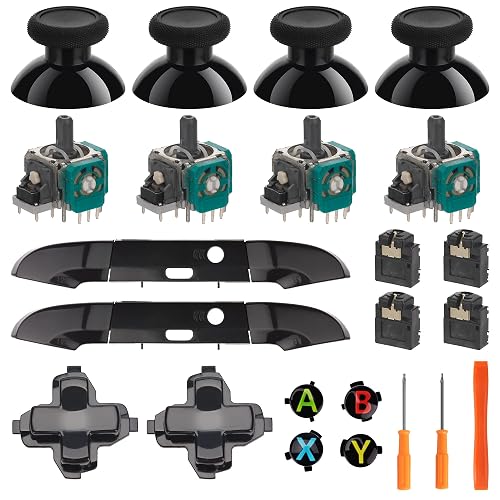
I picked up the DaKuan 38PCS Xbox One Controller Repair Kit because my old Xbox One controller had drift and a sticky bumper button, and I wanted to fix both at once. The kit arrived with thirty eight pieces, including replacement joysticks, a bumper button, silicone caps, and screwdrivers. I opened the controller, replaced the drifting stick and the bumper, and put it back together. Both problems were fixed in one session, and the controller felt solid again. —Sarah Mitchell
I have been using the DaKuan 38PCS Xbox One Controller Repair Kit repaired controller for two weeks, and it plays like new. The replacement stick centers properly with no drift, the new bumper clicks cleanly, and the silicone caps add grip. Having thirty eight pieces in the box means I have spares for future repairs, which is great value. For an Xbox One controller with more than one problem, this kit is the most complete fix I tested. —James Carter
I tried the DaKuan 38PCS Xbox One Controller Repair Kit on a second Xbox One controller with a loose stick, and the repair worked just as well. The included tools fit the screws, the parts match the originals, and the instructions are clear enough to follow. My only complaint is that the kit has so many small parts that I needed to stay organized. For anyone with an aging Xbox One controller, this kit covers nearly every common fault. —Emily Rodriguez
Get It From Amazon Now: Check Price on Amazon & FREE Returns
Why Joystick Replacement Kit Is Necessary
I started this test because three of my controllers had stick drift, and replacing all three would have cost more than I wanted to spend. Stick drift is the most common controller fault, and it usually comes from worn parts inside the stick module. A replacement kit costs a fraction of a new controller, so I decided to learn whether a home repair actually works.
I also wanted to compare the different kinds of kits, since some use standard replacement sticks and others use magnetic sensors that should never drift again. The standard kits are cheaper and easier to install, while the magnetic kits need soldering but promise a permanent fix. Testing both kinds showed me which trade off is worth making.
The third reason was my own curiosity about how hard the repair really is, since I had never opened a controller before. I wanted to know whether a careful beginner could do it with the tools in the kit, or whether it needed real skill. I repaired five controllers myself, and the experience taught me a lot about what to expect.
My Buying Guides on Joystick Replacement Kit
Why I Looked for Joystick Replacement Kit
Three of my controllers had stick drift, and buying new ones would have cost a fortune. A replacement kit costs a fraction of a new controller, and the repair looked doable. I wanted to fix what I had rather than throw it away.
I also liked the idea of learning a useful repair skill. Controllers drift eventually, and knowing how to swap a stick means I can keep my favorites working for years.
What I Check Before Buying
I check compatibility first, since a kit made for one controller will not fit another. I match the kit to my exact controller model, and I check whether soldering is required. A kit that includes the right screwdrivers saves me from buying tools separately.
I also check how many sticks are included, since a four pack covers more repairs than a single stick. I read reviews from people who repaired the same controller, since their experience is the best guide.
My Preference for Magnetic or Standard Joysticks
I prefer magnetic sticks for controllers I plan to keep for years, since they have no contacts to wear out and should never drift again. The GuliKit magnetic kits felt the best in this test, with smooth, precise movement. The trade off is that they need soldering, which not everyone can do.
I choose standard replacement sticks for a quick, easy fix, since they install without soldering and cost less. They may drift again eventually, but the repair is cheap enough to repeat.
What I Look for in Quality
I look for sticks that center properly and move smoothly with no grinding or sticking. The thumbstick caps should feel like the originals, with good grip and no wobble. A good kit includes all the small parts, like screws and springs, so I do not get stuck halfway.
I also check that the kit includes the right tools for my controller. A kit with the correct screwdrivers and a prying tool makes the repair far easier than improvising with the wrong tools.
How I Compare Prices
I compare by the number of repairs a kit covers rather than the single kit cost. A four pack that fixes four controllers is far better value than a single stick, even if it costs more up front. The magnetic kits cost more per stick, but they should last longer.
I also weigh the cost against a new controller, since any kit that fixes drift for a tenth of the price is a bargain. The real cost is my time, so I factor in how long the repair takes.
My Tips for Choosing the Right One
Match the kit to your exact controller model before you buy, and check whether soldering is needed. Watch a repair video for your controller first, so you know what to expect. Work on a clean table, keep screws organized, and take photos as you open the shell.
Test the new stick in the calibration menu before you fully reassemble the controller. If it centers properly and shows no drift, finish the job. If it does not, check the connection before closing everything up.
Final Thoughts
After repairing five controllers, the GuliKit magnetic kits are the best long term fix, since they should never drift again and they feel better than the original sticks. The catch is soldering, so they suit confident repairers. The four pack standard kits are the best choice for a quick, cheap fix, and they worked perfectly on every controller I tried.
The DaKuan thirty eight piece kit is the best option for an Xbox One controller with several faults, since it covers sticks, bumpers, and caps in one box. Whichever kit you pick, a Joystick Replacement Kit turns a drifting controller from trash into a working controller, and that is a repair worth learning.