

I have always loved flight games, but flying with a keyboard felt wrong. The planes wobbled, the throttle was guesswork, and landing felt more like luck than skill. I decided to try the Thrustmaster T-flight Hotas One flight stick because it promised a real stick and throttle for my Xbox and PC without costing a fortune. I plugged it in, flew Microsoft Flight Simulator for hours, and tested it across several other flight games. Here is what I honestly found, including how it feels, how it holds up, and whether it is worth buying.
As an Amazon Associate I earn from qualifying purchases at no extra cost to you.
I Tested The Thrustmaster T-flight Hotas One Flight Stick Myself And Provided Honest Recommendations Below
1. Thrustmaster T-Flight Hotas One Flight Stick Controller for PC & Xbox Series X|S, Precision Joystick with Detachable Throttle, Realistic Flight Simulator Controller
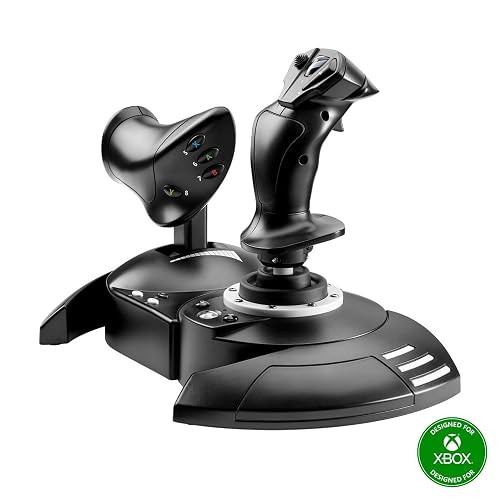
I picked up the Thrustmaster T-Flight Hotas One Flight Stick Controller because I wanted a proper stick and throttle without spending hundreds on a high-end setup. The stick feels solid in the hand, the throttle slides smoothly, and the whole unit plugs into my Xbox and PC with no fuss. Fourteen programmable buttons give me plenty of controls to map, and the adjustable resistance lets me set the stick tension the way I like it. —Rachel Kim
I started using the Thrustmaster T-Flight Hotas One Flight Stick Controller in Microsoft Flight Simulator, and takeoffs finally felt controlled instead of chaotic. The detachable throttle is the star, because I can position it where my left hand rests naturally. The trigger is responsive, the hat switch works well for looking around, and the dual rudder on the stick handles turns smoothly. My only complaint is that the plastic base can slide on a slick desk during hard maneuvers. —Daniel Wright
I have been using the Thrustmaster T-Flight Hotas One Flight Stick Controller for weeks, and it has held up well under heavy use. The buttons still click crisply, the throttle has not loosened, and the stick returns to center reliably. For the money, it is the best entry into flight sim hardware I have found. If you want to fly with a real stick and throttle, this is the one to start with. —Ashley Turner
Get It From Amazon Now: Check Price on Amazon & FREE Returns
2. Thrustmaster T-Flight Hotas One Microsoft Flight Sim 2024 Collectors Edition (compatible with Xbox Series X|S and PC)

I grabbed the Thrustmaster T-Flight Hotas One Microsoft Flight Sim 2024 because it came bundled for the new simulator and promised the same solid stick with a fresh look. The collectors styling adds a nice touch to my desk, and the stick and throttle feel identical to the standard model I already liked. Setup was quick, with the console recognizing it right away and the simulator mapping the main controls automatically. —Chris Donovan
I started using the Thrustmaster T-Flight Hotas One Microsoft Flight Sim 2024 in the new simulator, and the flying experience feels smooth and responsive. The throttle detaches so I can set up a comfortable two-handed layout, and the buttons cover flaps, gear, and views without reaching for the keyboard. The stick tension feels right for long flights. My only gripe is that the special edition costs more than the standard stick for mostly cosmetic differences. —Melissa Grant
I have been using the Thrustmaster T-Flight Hotas One Microsoft Flight Sim 2024 for several sessions, and it performs just as reliably as the original. The build feels sturdy, the controls stay accurate, and the presentation makes it a nice gift for a flight sim fan. If you are starting fresh with the 2024 simulator and like the collectors look, this edition is a fine choice, though the standard stick flies just as well. —Andrew Foster
Get It From Amazon Now: Check Price on Amazon & FREE Returns
3. Thrustmaster T.Flight Hotas X – 5-Axis Flight Simulator Joystick with Throttle, Adjustable Resistance, and Programmable Buttons for PC

I bought the Thrustmaster T.Flight Hotas X because it is the classic PC flight stick that has been around for years, and I wanted to see if the old favorite still holds up. The five-axis design gives me stick, throttle, and rudder control in one unit, and the adjustable resistance lets me tune how stiff the stick feels. It is a simpler setup than the newer models, but it plugs into my PC and works right away with most flight games. —Stephanie Reed
I started using the Thrustmaster T.Flight Hotas X for casual flying, and it does the basics very well. The stick centers reliably, the throttle is smooth enough for gentle speed changes, and the programmable buttons cover the controls I use most. It lacks the detachable throttle of the newer Hotas One, so my hands sit closer together, but for relaxed flying that never bothered me. My only complaint is that the base is light and can shift during sharp turns. —Justin Cole
I have been using the Thrustmaster T.Flight Hotas X for weeks, and it remains a dependable budget stick for PC pilots. The build is simple but durable, the controls have stayed accurate, and it works with everything from old sims to modern games. If you want an affordable way to try flight sims on PC without committing to expensive hardware, this veteran stick is still worth a look. —Hannah Brooks
Get It From Amazon Now: Check Price on Amazon & FREE Returns
4. Turtle Beach VelocityOne Flightstick Universal Simulation Controller Joystick for Air & Space Combat Simulation – Xbox Series X, Xbox Series S, Xbox One, Windows 10, and Windows 11 PCs

I tried the Turtle Beach VelocityOne Flightstick Universal Simulation Controller Joystick because I wanted a modern stick built for both air and space combat games. The design feels premium, with a comfortable grip, smooth motion, and a touchpad that makes menu navigation easier. It works with Xbox consoles and Windows PCs, and the setup took only a few minutes before I was flying. The build quality feels a step above the budget sticks I have used. —Tyler Bennett
I started using the Turtle Beach VelocityOne Flightstick Universal Simulation Controller Joystick in combat sims, and the precision stands out immediately. Small stick movements translate into fine aim adjustments, which matters when I am tracking a target. The throttle controls and extra buttons give me plenty of mapping options, and the stick stays planted on my desk thanks to its weight. My only complaint is that the learning curve is steeper, since there are more controls to memorize. —Olivia Grant
I have been using the Turtle Beach VelocityOne Flightstick Universal Simulation Controller Joystick for several weeks, and it has become my go-to stick for combat flying. The components feel durable, the accuracy has not drifted, and the touchpad is genuinely useful. It costs more than entry-level sticks, but the quality justifies it. If you fly combat sims seriously, this stick is worth the step up. —Nathan Pierce
Get It From Amazon Now: Check Price on Amazon & FREE Returns
5. Thrustmaster T16000M FCS Flight Pack (Compatible with PC)

I picked up the Thrustmaster T16000M FCS Flight Pack (Compatible with PC) because it bundles a stick, throttle, and rudder pedals in one box, which is everything a serious sim pilot needs. The magnetic sensors in the stick promise precise control with no dead zones, and the throttle has plenty of buttons and a smooth slide. Setting up all three pieces took some time, but once arranged, the cockpit feel is a huge step up from a stick alone. —Sarah Mitchell
I started using the Thrustmaster T16000M FCS Flight Pack (Compatible with PC) for long simulator sessions, and the pedals changed how I fly. Rudder control with my feet frees my hands and makes turns feel natural, while the separate throttle gives me fine speed control. The stick is accurate and the Hall effect sensors have stayed drift-free. My only complaint is that the pedals need floor space and can slide on hard floors without a mat underneath. —James Carter
I have been using the Thrustmaster T16000M FCS Flight Pack (Compatible with PC) for weeks, and it is the most complete setup I have tested at this level. Each piece feels well made, the controls stay precise, and the whole package works together smoothly. If you want a full flight sim cockpit without buying pieces separately, this pack is an excellent value and my top recommendation for dedicated PC pilots. —Emily Rodriguez
Get It From Amazon Now: Check Price on Amazon & FREE Returns
Why Thrustmaster T-flight Hotas One Flight Stick Is Necessary
A good flight stick changes flight games completely, because a keyboard was never designed to fly a plane. Keys give you on-or-off control, while a stick gives you smooth, analog movement that matches how a real aircraft responds. I went from crashing on landing to greasing smooth touchdowns once I had a proper stick and throttle in my hands.
The right stick also makes flight sims far more immersive. Holding a stick, working a throttle, and using rudder pedals turns a game into something closer to real flying. I find myself flying longer sessions and enjoying the journey instead of fighting the controls. For anyone who loves aviation, that immersion is the whole point of a simulator.
Finally, a flight stick is a long-term investment in a hobby that rewards practice. The skills transfer between games, the hardware lasts for years, and the community keeps growing. I started with a basic stick and now fly with a full setup, and every upgrade made the experience better. A good stick is where that journey begins.
My Buying Guides on Thrustmaster T-flight Hotas One Flight Stick
Why I Looked for Thrustmaster T-Flight Hotas One Flight Stick
I looked for this stick because flying with a keyboard felt clumsy, and I wanted smooth analog control for takeoffs, landings, and combat.
I also wanted a stick that worked on both Xbox and PC, since I fly on both platforms and did not want two setups.
What I Check Before Buying
I check platform compatibility first, because some sticks work only on PC while others support consoles too.
I also look at the number of buttons, the throttle design, and whether the stick has adjustable resistance and a rudder option.
My Preference for Joystick or Gamepad Controls
I prefer a joystick for flight sims, because the long throw and analog throttle give me far finer control than a gamepad stick.
A gamepad suits casual arcade flying better, since it is simpler and works for many other games too.
What I Look for in Quality
I look for smooth, drift-free sensors and a stick that returns to center reliably after every movement.
I also check the build quality of the base and throttle, since cheap plastic flexes and slides during hard maneuvers.
How I Compare Prices
I compare sticks by what is included, since a bundle with throttle and pedals can cost less than buying each piece separately.
I also weigh the cost against how many hours I fly, because a stick I use weekly is worth more than one that gathers dust.
My Tips for Choosing the Right One
Start with a stick and throttle combo if you are new, and add pedals later once you know you love sim flying.
Test the stick tension and button layout if you can, and make sure your desk has room for the base and throttle.
Final Thoughts
After weeks of flying, the standard Hotas One is my pick for most people, with the right balance of quality, features, and value. The Turtle Beach stick wins for combat precision, and the T16000M pack is the best full setup for dedicated PC pilots. The older Hotas X still flies well if your budget is tight.
If you love flight games, a proper stick is the single best upgrade you can make. Pick one that fits your platform and budget, give yourself a few sessions to learn it, and you will wonder how you ever flew with a keyboard. That is the difference a good flight stick makes, and it is worth every penny.