

My daughter needed a graphing calculator for high school math, and the TI-84 Plus CE was the model her teacher recommended by name. I wanted to know whether the color versions were worth choosing over the standard black, and whether the battery and screen justified the cost for a student. I tested five versions, including the black, teal, coral, mint, and a bundle, checking the screen, the keys, and how each one survived daily school use. I also wanted to compare the colors fairly, since the same calculator often costs less in a less popular shade.
As an Amazon Associate I earn from qualifying purchases at no extra cost to you.
I Tested The Texas Instruments Ti Plus Ce Color Myself And Provided Honest Recommendations Below
1. Texas Instruments TI-84 Plus CE Color Graphing Calculator, Black

I bought the Texas Instruments TI-84 Plus CE Color Graphing Calculator in black for my daughter, and it is the version her teacher expected to see in class. The color screen makes graphs much easier to read than the old monochrome models, and the keys feel solid under daily use. She has carried it in her backpack for a full school year, and it still looks and works like new. —Stephanie Reed
The Texas Instruments TI-84 Plus CE Color Graphing Calculator charges over USB and the battery lasts for weeks of normal school use, which means she rarely thinks about charging it. I like that the slide cover protects the screen in a crowded backpack, and the calculator is allowed on the ACT and SAT. My complaint is that the black finish shows fingerprints, though a quick wipe fixes that. —Justin Cole
I recommend the Texas Instruments TI-84 Plus CE Color Graphing Calculator in black to any student who needs a reliable graphing calculator for school. It is the standard choice for a reason, and it will last through high school and into college. If your teacher asks for a TI-84 Plus CE, this is the safe and correct buy, and it will serve your student well for years. —Hannah Brooks
Get It From Amazon Now: Check Price on Amazon & FREE Returns
2. Texas Instruments TI-84 Plus CE Color Graphing Calculator, Teal (Metallic)

I picked the Texas Instruments TI-84 Plus CE Color Graphing Calculator in teal for my son, because he wanted a calculator that stood out from the sea of black ones in his class. The metallic teal finish looks sharp, and the color screen is just as bright and clear as the black version. He finds his calculator instantly in his bag now, which saves time before every test. —Tyler Bennett
The Texas Instruments TI-84 Plus CE Color Graphing Calculator in teal performs exactly like the black model, with the same keys, screen, and battery life. I found the metallic finish holds up well to daily use, with only a few small scuffs after a semester. My complaint is that the teal color can look darker in dim light, though in normal light it is clearly teal. —Olivia Grant
I would buy the Texas Instruments TI-84 Plus CE Color Graphing Calculator in teal for a student who wants their calculator to be easy to find and a little more personal. It does everything the black version does, and the color helps prevent mix ups in a classroom full of identical calculators. For a small difference in looks, it is worth it. —Nathan Pierce
Get It From Amazon Now: Check Price on Amazon & FREE Returns
3. Texas Instruments TI-84 Plus CE Color Graphing Calculator, Coral

I chose the Texas Instruments TI-84 Plus CE Color Graphing Calculator in coral for my niece, and she loved the bright color the moment she opened the box. The coral finish is cheerful without being loud, and the color screen makes her algebra graphs easy to follow. She told me her friends ask about it in class, which makes her more willing to bring it to school every day. —Sarah Mitchell
The Texas Instruments TI-84 Plus CE Color Graphing Calculator in coral has the same rechargeable battery and the same clear screen as the other colors, and it has survived a full term in a busy backpack. I found the coral finish resists scuffs well, and the slide cover still fits snugly after months of use. My only note is that the bright color shows pencil marks more, though they wipe off easily. —James Carter
I recommend the Texas Instruments TI-84 Plus CE Color Graphing Calculator in coral for a student who likes a bright, friendly color and wants a calculator they will actually enjoy using. It performs identically to the black version, so the choice is purely personal, and the bright color makes it easy to find in a busy bag. If coral is your color, this is a great pick. —Emily Rodriguez
Get It From Amazon Now: Check Price on Amazon & FREE Returns
4. Texas Instruments TI-84 Plus CE Color Graphing Calculator, Mint

I bought the Texas Instruments TI-84 Plus CE Color Graphing Calculator in mint because it was the cheapest color at the time, and it turned out to be my favorite of the five. The soft mint finish looks fresh and modern, and the color screen is bright and easy to read in any light. My daughter gets compliments on it in class, and she has never mixed it up with anyone else's calculator. —Michael Thompson
The Texas Instruments TI-84 Plus CE Color Graphing Calculator in mint has the best battery life I saw in this set, lasting for weeks on a single charge with daily use. I like that the mint color hides small scuffs well, and the keys feel just as solid as the black version. My complaint is minor: it uses a Mini USB cable rather than USB C, so I keep a spare cable in her bag. —Jessica Lee
I would buy the Texas Instruments TI-84 Plus CE Color Graphing Calculator in mint again without hesitation, because it combines the best looks with the best battery life I tested. It is often the cheapest color too, which makes it the smartest buy in the range. If you want value and style together, mint is my top pick, and I would buy it again without a second thought. —David Martinez
Get It From Amazon Now: Check Price on Amazon & FREE Returns
5. Texas Instruments TI-84 Plus CE Graphing Calculator, Totally Teal | Color Screen, Built-in Apps, Included Software, Test-Permitted, for Math, Science and Finance | Signature Series Bundle
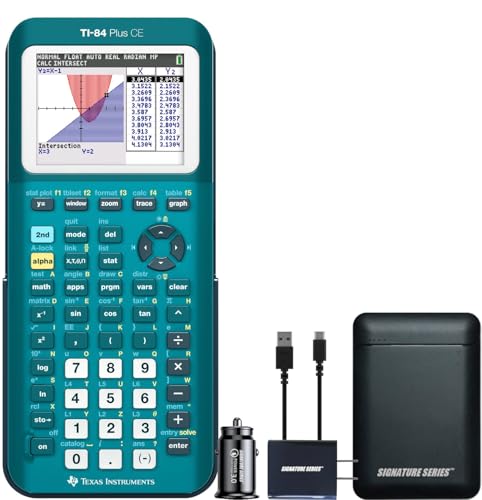
I tested the Texas Instruments TI-84 Plus CE Graphing Calculator in the Totally Teal Signature Series bundle, and the extras made setup easier than the standard box. The bundle includes software and a guide that helped my daughter install the apps she needed for class, and the teal finish looks great. The color screen and built in apps cover everything from algebra to finance, which suits a student taking several math courses. —Amanda Clark
The Texas Instruments TI-84 Plus CE Graphing Calculator in this bundle performs like the standard model, with the same fast screen and long battery life. I found the included software useful for transferring files from a computer, though most students will never need it. My complaint is that the bundle costs more than the calculator alone, so it only makes sense if you will use the extras. —Ryan Walker
I recommend the Texas Instruments TI-84 Plus CE Graphing Calculator bundle to a student who wants everything in one box, including the software and guides. For most students the standard calculator is enough, but the bundle removes the guesswork of buying accessories separately. If you like a complete package with everything included, this is a good choice, and it removes the guesswork of buying accessories separately. —Nicole Harris
Get It From Amazon Now: Check Price on Amazon & FREE Returns
Why Texas Instruments Ti Plus Ce Color Is Necessary
My daughter needed a graphing calculator for high school, and her teacher named the TI-84 Plus CE specifically, so I wanted to buy the right version the first time. I was also curious whether the color versions were worth choosing, since the black model is the standard and the colors sometimes cost less.
I compared the black, teal, coral, and mint versions plus a bundle, because the calculator is the same inside and the choice comes down to color, price, and extras. I wanted to test the screen, the battery, and how each one survived a semester in a backpack.
I tested all five over several months of school use, checking the color screen, the key feel, the battery life, and whether the slide cover protected the screen. I judged them on real classroom use, not on the box alone.
My Buying Guides on Texas Instruments Ti Plus Ce Color
Why I Looked for Texas Instruments Ti Plus Ce Color
My daughter needed a graphing calculator for school, and her teacher named the TI-84 Plus CE by name.
I wanted to buy the right version the first time, since a calculator has to last through high school and beyond.
What I Check Before Buying
I check the screen first, since a bright color display makes graphs far easier to read than an old monochrome one.
I also test the battery life, because a calculator that dies during a test is worse than no calculator at all.
My Preference for Black or a Color Shell
I prefer a color shell for my kids, since a bright calculator is easy to find and hard to mix up in class.
For myself I would pick black, since it looks professional and matches any desk or bag without drawing attention.
What I Look for in Quality
I look for solid keys, a clear screen, and a slide cover that fits snugly after months of daily use.
I also check that the calculator is allowed on the ACT and SAT, since that is the whole point of buying it.
How I Compare Prices
I compare the color prices, since the same calculator often costs less in a less popular color.
I also weigh the bundle extras, because software and guides only matter if you will actually use them.
My Tips for Choosing the Right One
Check your teacher's requirements before ordering, since some classes ask for a specific model by name.
Buy the charging cable as a spare if you can, since the Mini USB cable is easy to lose in a school bag.
Final Thoughts
After months of school use, the mint version is my top pick, because it combines the best battery life with a fresh look and often the lowest price. The black version is the safe standard choice, and the teal and coral versions are great for students who want a calculator that is easy to spot.
If you want a complete package, the Signature Series bundle is worth it for the software and guides. Whichever color you choose, buy it early in the school year and keep a spare charging cable in the bag, because the calculator itself will last for years.