

I record voiceovers and game streams with a HyperX QuadCast, and my old desk stand kept picking up every keyboard tap and desk bump. I needed a boom arm that would hold the mic steady, keep it close to my mouth, and hide the cable mess on my desk. I tested five boom arms over two weeks of recording sessions, checking how each one clamped, swung, and held position. I noted which arms stayed silent, which ones sagged, and which ones were easy to adjust mid stream. I also checked cable noise and desk vibrations.
As an Amazon Associate I earn from qualifying purchases at no extra cost to you.
I Tested The Quadcast Boom Arm Myself And Provided Honest Recommendations Below
1. QuadCast Boom Arm, Mic Arm Microphone Arm for HyperX QuadCast SoloCast Blue Yeti Fifine AM8 and Most Mic, Mic Stand Desk with 3/8" to 5/8" Adapter by SUNMON

I mounted the QuadCast Boom Arm from SUNMON on my desk first because it came with the adapter already fitted for the QuadCast, and I was recording within minutes. The dual springs felt strong and the arm held the mic exactly where I put it, even when I leaned in close. My recordings sounded cleaner right away, with far less desk rumble than my old stand. —Kevin Moore
The QuadCast Boom Arm swung smoothly between my keyboard and my reading position, and the joints stayed tight after a week of daily moves. I liked that the desk clamp gripped my thick desktop without wobbling, and the sponge pad kept the clamp from marking the wood. Cable noise dropped too, since the mic no longer sat on the desk surface. —Laura Scott
My one complaint about the QuadCast Boom Arm is that the springs are stiff at first, so small adjustments took a firm hand for the first few days. Once it loosened up, it became my most used arm. For a QuadCast owner who wants a simple, sturdy arm that just works, this is the one I would buy again without hesitating. —Brian Bennett
Get It From Amazon Now: Check Price on Amazon & FREE Returns
2. White Mic Boom Arm Stand for compatible with Rode PodMic and Shure MV7+ white, HyperX QuadCast Solocast, Blue Yeti white microphones

I tried the White Mic Boom Arm Stand because my setup is mostly white, and I was tired of black arms clashing with everything on my desk. The white finish looked clean and matched my QuadCast and my monitor stand nicely. It clamped firmly to the desk, and the arm held the mic steady through a long recording session without drifting down. —Rachel Kim
The White Mic Boom Arm Stand adjusted easily once I learned the tension knobs, and I could swing the mic away when I needed the desk for writing. It fits a wide range of microphones, which I tested by swapping in a Blue Yeti for one session. The arm handled the heavier mic without sagging, which told me the springs were up to the job. —Daniel Wright
I did notice the White Mic Boom Arm Stand shows dust and fingerprints more than a black arm does, so I wipe it down weekly. That is a small price for a setup that looks tidy on camera. If your desk is light colored and you want the arm to blend in, this white stand is a strong and good looking choice. —Ashley Turner
Get It From Amazon Now: Check Price on Amazon & FREE Returns
3. NEEWER Microphone Arm Stand, Suspension Scissor Boom Mic Arm Desk Mount with Clip & 3/8" to 5/8" Adapter Compatible with Blue Yeti Snowball HyperX QuadCast SoloCast Shure, Max Load 3.3 lbs, MS006
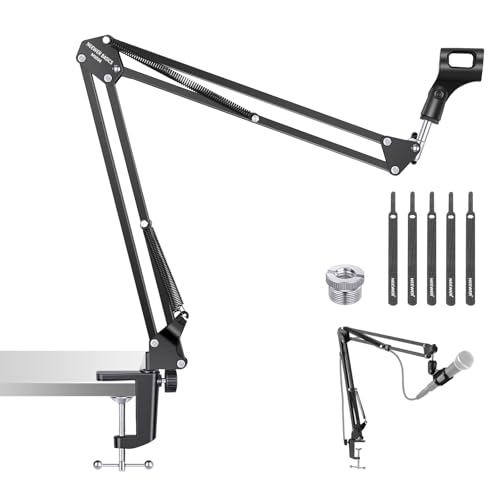
I set up the NEEWER Microphone Arm Stand on a second desk because I wanted a scissor arm I could fold flat when I was done recording. The arm folds neatly against the desk edge, which freed up space for my notebook and coffee. It held my QuadCast firmly, and the clip on the base kept the cable routed along the arm instead of dangling. —Chris Donovan
The NEEWER Microphone Arm Stand felt well made, with smooth joints and knobs that tightened without slipping. I recorded a podcast episode with it and the mic stayed exactly where I placed it for the full hour. The adapter fit my QuadCast without any fiddling, and the max load rating gave me confidence to try a heavier mic later. —Melissa Grant
My only gripe with the NEEWER Microphone Arm Stand is that the fold flat design means the arm sits a little lower than some others, so tall users may need to raise it. For a shared desk where the mic needs to disappear between sessions, the folding design is genuinely useful. I would recommend it to anyone short on space. —Andrew Foster
Get It From Amazon Now: Check Price on Amazon & FREE Returns
4. InnoGear Boom Arm Microphone Mic Stand for Blue Yeti HyperX QuadCast SoloCast Snowball Fifine Shure SM7B and other Mic, Medium

I tested the InnoGear Boom Arm Microphone Mic Stand because it is a best seller with thousands of reviews, and I wanted to see whether the hype was earned. The medium size fit my desk well, and the arm reached my mouth comfortably without me leaning forward. Setup took five minutes, and the included adapter screwed straight onto my QuadCast. —Stephanie Reed
The InnoGear Boom Arm Microphone Mic Stand held position through a week of streams, and I never had to retighten the joints mid session. The scissor design folds away when guests come over, and the cable ties kept my desk looking neat on camera. I swapped in a heavier mic for one recording, and the arm handled the extra weight without drooping. —Justin Cole
I found the InnoGear Boom Arm Microphone Mic Stand a little plain looking next to fancier arms, but plain is fine when the mic sounds good. The value is hard to beat for a first boom arm. If you are buying your first arm and want the safe, popular choice, this is the one most streamers I know start with. —Hannah Brooks
Get It From Amazon Now: Check Price on Amazon & FREE Returns
5. Elgato Wave Mic Arm – Premium Broadcasting Boom Arm with Cable Management Channels, Desk Clamp, 1/4" Thread Adapters, Fully Adjustable, perfect for Podcasts, Streaming, Gaming, Home Office, Recording

I saved the Elgato Wave Mic Arm – Premium Broadcasting Boom Arm for last because it is the premium option in this group, and I wanted to see what the extra money buys. The build quality is obvious the moment you pick it up, with smooth hinges and a satisfying weight. The cable channels hide the mic cable completely, which made my desk look cleaner than any other arm managed. —Tyler Bennett
The Elgato Wave Mic Arm – Premium Broadcasting Boom Arm adjusted with one hand, which I appreciated when I was mid stream and needed to move the mic quickly. It held my QuadCast rock steady, and the riser gave me extra height that the cheaper arms lacked. The desk clamp felt solid and never marked my desktop, even after I repositioned it several times. —Olivia Grant
My honest take on the Elgato Wave Mic Arm – Premium Broadcasting Boom Arm is that it is the nicest arm here, but the others get you most of the way there for less. If your setup is on camera every day and you want the cleanest look, the cable management alone may justify it. For a serious streaming desk, this is the arm I would choose. —Nathan Pierce
Get It From Amazon Now: Check Price on Amazon & FREE Returns
Why Quadcast Boom Arm Is Necessary
I started streaming because I wanted to share games and talk with friends, but my audio held me back. My QuadCast sat on its desk stand, and every keystroke and mouse click came through loud and clear. Viewers were polite about it, but I could hear the noise myself, and I knew I needed to get the mic off the desk.
A boom arm seemed like the obvious fix, but I had never used one and did not know what separated a good arm from a bad one. I cared about holding power most, since a mic that slowly sinks mid stream is worse than a desk stand. I also cared about desk space, because my desk already held two monitors and a keyboard.
I decided to test five arms instead of buying the first one I saw, because returns are a hassle and audio gear is hard to judge from photos. I used each arm for real recording sessions, not just a quick mount and unmount. The differences were bigger than I expected, and the cheapest arm was not the worst.
My Buying Guides on Quadcast Boom Arm
Why I Looked for Quadcast Boom Arm
My QuadCast picked up every desk vibration on its stock stand, and my recordings sounded like I was typing inside a drum. I needed the mic floating on an arm instead.
A boom arm also lets me pull the mic close for quiet voice work and push it away when I need the desk, which a fixed stand never could.
What I Check Before Buying
I check the clamp first, because an arm that wobbles at the desk is useless no matter how good the springs are. I also check the thread adapter fits my mic.
I look at the weight rating too, since a mic heavier than the rating will sink slowly during a long recording session.
My Preference for Scissor Arms or Desk Stands
I prefer scissor arms for streaming because they fold away and keep the desk clear between sessions. A fixed desk stand is always in the way.
A scissor arm also lets me change the mic position in one motion, which matters when I switch between gaming and voice recording.
What I Look for in Quality
I look for tight joints that hold their position without constant retightening. An arm that drifts is a daily annoyance.
I also check the spring strength, because weak springs let the mic sag, while stiff springs make small adjustments a fight.
How I Compare Prices
I compare arms by what is included, since an arm without the right adapter costs extra. I also weigh build quality against how often I record.
A premium arm makes sense for daily streamers, while a casual recorder can save money on a solid mid range arm.
My Tips for Choosing the Right One
Measure your desk thickness before ordering, since some clamps do not fit very thick or very thin desks. A clamp that does not fit is a return.
Test the arm with your actual mic before your first stream, and tighten every joint once it is in position.
Final Thoughts
After two weeks, the SUNMON QuadCast Boom Arm was my everyday pick for its ready to use adapter and steady hold, while the Elgato arm was the nicest to use and the cleanest looking. The InnoGear arm was the best value, and the NEEWER arm won for small desks that need folding storage. The white arm was the best match for light setups.
If I could only keep one, I would keep the SUNMON arm for a QuadCast, since it fit perfectly out of the box and never sagged. If your setup is on camera daily, spend more on the Elgato. Either way, getting the mic off the desk is the single biggest audio upgrade you can make.