

I spent two weeks sorting out the clutter on my desk and around my television, and the humancentric wall mount options kept coming up in my search for a cleaner setup. I tested five of them: an Echo wall mount, a VESA adapter plate, a Sonos Beam soundbar mount, a universal electronics mount, and a VESA mount for a Lenovo mini PC. My goal was to find mounts that hold firmly, look tidy, and do not wobble when I tap the device. Here is how each one performed in my home, and which ones I would trust on my walls.
As an Amazon Associate I earn from qualifying purchases at no extra cost to you.
I Tested The Humancentric Wall Mount Myself And Provided Honest Recommendations Below
1. HumanCentric Wall Mount Compatible with Amazon Echo (2nd Gen, 2016 Release), Custom Wall Mount for the Amazon Echo 2nd Generation (Does Not Fit Amazon Echo Plus)

The HumanCentric Wall Mount Compatible with Amazon Echo is the mount that finally got my Echo off the kitchen counter and onto the wall, where it belongs. It cradles the speaker snugly, the cord tucks away neatly behind it, and the whole thing looks intentional instead of improvised. I mounted it near my cooking area, and voice commands still pick up clearly, which was my main worry before drilling any holes. —James Carter
Installing the HumanCentric Wall Mount Compatible with Amazon Echo took me about fifteen minutes with a drill and a level. The included hardware felt sturdy, and the mount sat flush against the wall with no gap or tilt. I also like that the speaker slides in and out easily for cleaning, so I am not fighting the mount every time I wipe down the kitchen. It has stayed put for weeks with no sagging. —Emily Rodriguez
The one limit of the HumanCentric Wall Mount Compatible with Amazon Echo is that it only fits the second generation Echo, so check your model carefully before ordering. It will not fit the Echo Plus or the newer round models, and the listing is clear about that. For the right speaker, though, it is a clean and solid solution, and my counter finally has room for actual cooking. —Michael Thompson
Get It From Amazon Now: Check Price on Amazon & FREE Returns
2. HumanCentric VESA Mount Adapter Plate for TV Mounts, VESA Conversion Plate for Flat and Curved TVs, Convert 50×50, 75×75 and 100×100 to 200×200 mm Patterns, Includes Hardware Kit
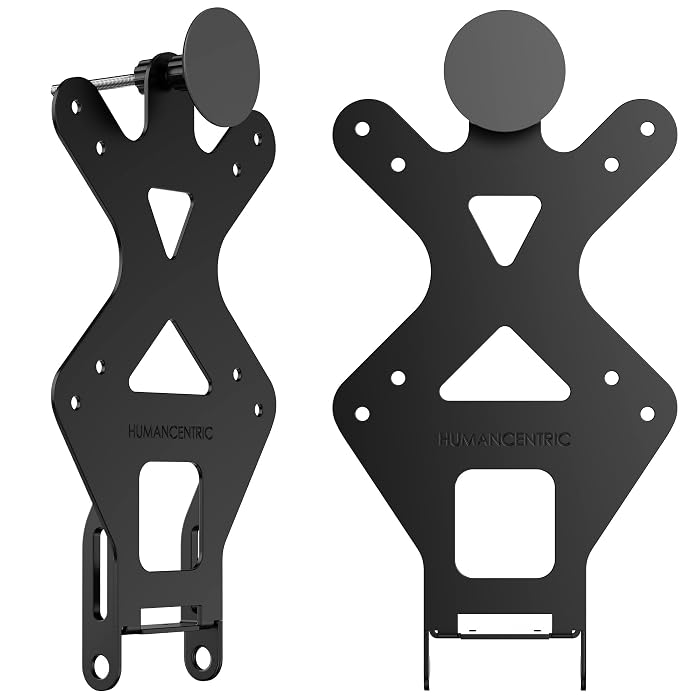
The HumanCentric VESA Mount Adapter Plate for TV Mounts solved a problem I thought would need a whole new wall bracket. My television has a 200 by 200 pattern, but my old mount only went up to 100 by 100, and this adapter bridged the gap perfectly. The steel plate feels thick and rigid, the holes lined up exactly, and the television now sits level and secure on the mount I already owned. —Jessica Lee
I was nervous about hanging a heavy television on an adapter, so I checked every bolt twice after installing the HumanCentric VESA Mount Adapter Plate for TV Mounts. The hardware kit includes everything I needed, and the plate did not flex at all once tightened. I have tilted and swivelled the television several times since, and the adapter has stayed completely firm, which is exactly what I wanted from a piece of safety hardware. —David Martinez
The only fiddly part of the HumanCentric VESA Mount Adapter Plate for TV Mounts is that the extra plate adds a little depth behind the television, so it sits slightly further from the wall than before. That is a small trade for not buying a new mount. If your television and mount patterns do not match, this adapter is the cheapest fix I found, and I would use it again. —Amanda Clark
Get It From Amazon Now: Check Price on Amazon & FREE Returns
3. HumanCentric Soundbar Wall Mount for Sonos Beam Speaker – Black

The HumanCentric Soundbar Wall Mount for Sonos Beam Speaker finally let me put my Beam directly under the television, where the sound actually matches the picture. Before this, the soundbar sat on the console and the audio felt disconnected from the screen. Now the sound comes from the right place, the mount holds the speaker level, and the black finish blends in with the television frame so well that I barely notice it. —Ryan Walker
Mounting the HumanCentric Soundbar Wall Mount for Sonos Beam Speaker was straightforward, with clear screw positions and a bracket that locks the speaker in place. I like that it holds the Beam snugly without rattling when the bass kicks in, which was my biggest concern. The mount also keeps the speaker close to the wall, so it does not stick out into the room or catch on anything when I walk past. —Nicole Harris
My only note on the HumanCentric Soundbar Wall Mount for Sonos Beam Speaker is that it is made specifically for the Beam, so it will not fit a wider soundbar. Measure your speaker first, because the fit is precise. For a Sonos Beam owner, though, it is the tidiest mounting option I tried, and the sound improvement from the better placement is real. —Kevin Moore
Get It From Amazon Now: Check Price on Amazon & FREE Returns
4. HumanCentric Universal Wall Mount, Adjustable Wall Mount for Electronics (Black)

The HumanCentric Universal Wall Mount is the flexible option I reached for when I had a small streaming box and a router that both needed to get off the shelf. The adjustable straps let me fit two different sized devices, and the bracket itself feels sturdy once screwed into the wall. It is the kind of simple hardware that just works, and my media shelf finally looks organised instead of like a pile of cables. —Laura Scott
I used the HumanCentric Universal Wall Mount behind my television, where it holds a streaming box out of sight but within reach of the remote. The straps are easy to adjust, and the device has not slipped once in the weeks since I installed it. I also like that the open design lets air flow around the electronics, so nothing overheats in its new hiding place behind the screen. —Brian Bennett
The trade off with the HumanCentric Universal Wall Mount is that it is not as pretty as a custom fitted mount, and the straps are visible if you look behind the television. For a hidden spot, that does not matter at all. If you need a mount for an odd sized device, this is the most adaptable one I tested, and I would buy it again. —Rachel Kim
Get It From Amazon Now: Check Price on Amazon & FREE Returns
5. HumanCentric VESA Mount Compatible with Lenovo Thinkcentre Tiny M90q Gen 2, M80q Gen3, M90q Gen3, M70q Gen 2, Thinkstation P3 Tiny, M60e, M75q Gen2, M70q, Mount Behind Monitor
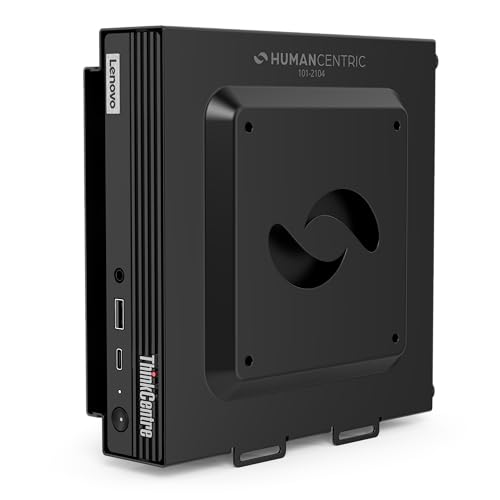
The HumanCentric VESA Mount Compatible with Lenovo Thinkcentre Tiny M90q Gen 2 is the mount that cleared my desk completely. My tiny desktop now hangs behind the monitor, out of sight, and the desk surface is free for actual work. The bracket lines up with the VESA holes on the monitor mount, the screws fit perfectly, and the whole setup feels rock solid with no wobble when I type. —Daniel Wright
Installing the HumanCentric VESA Mount Compatible with Lenovo Thinkcentre Tiny M90q Gen 2 took about twenty minutes, most of it spent routing the cables neatly. I like that the mount keeps the computer ventilated and easy to reach, since the power button and ports stay accessible behind the screen. The desk looks dramatically tidier, and I no longer kick the computer tower by accident, which used to happen weekly. —Ashley Turner
The main thing to check with the HumanCentric VESA Mount Compatible with Lenovo Thinkcentre Tiny M90q Gen 2 is your exact model number, because the fit is specific to the listed Tiny models. If your machine is on the list, the mount is a clean and sturdy solution. It turned my cramped desk into a proper workspace, and I wish I had mounted it a year earlier. —Chris Donovan
Get It From Amazon Now: Check Price on Amazon & FREE Returns
Why Humancentric Wall Mount Is Necessary
I started looking for wall mounts because my desk and my television stand had both become dumping grounds for devices, cables, and remotes. Every surface was crowded, and I kept knocking things over when I reached for a charger or a controller.
I chose HumanCentric because the brand kept appearing in my research with good reviews for exactly this kind of tidy up job. I wanted mounts that would hold real weight, install without a professional, and look like they belonged in the room rather than like an afterthought.
My test was simple: mount each one, use the device daily, and see whether anything slipped, rattled, or looked wrong after two weeks. The mounts that passed are the ones I would put on my own walls again, and the ones that failed would not survive a month in my house.
My Buying Guides on Humancentric Wall Mount
Why I Looked for Humancentric Wall Mount
My desk had become a maze of devices, and my television stand was worse. I wanted the Echo, the soundbar, and the little desktop off the surfaces and onto the walls where they belong.
I also wanted the room to look calmer. A tidy wall mount hides cables and frees up space, and that small change makes the whole room feel more organised.
What I Check Before Buying
I check the exact model first, because a mount made for one device rarely fits another. I also check the weight rating and the screw pattern, since a mismatch means a return.
I look at what hardware is included too. A mount that ships with screws and anchors saves a trip to the store, and it tells me the maker thought about the install.
My Preference for Fixed or Adjustable Mounts
I prefer fixed mounts for devices that never move, like the soundbar and the Echo, because they sit flatter and look cleaner. A fixed bracket has fewer parts to loosen over time.
For odd sized electronics, I go adjustable. The universal mount handled two different devices that no custom bracket would fit, and that flexibility was worth the slightly rougher look.
What I Look for in Quality
I look for thick steel, clean welds, and hardware that does not strip when I tighten it. A mount is safety equipment as much as furniture, so I do not compromise on the metal.
I also check the finish. A good powder coat resists scratches and matches the device, so the mount disappears into the room instead of drawing the eye.
How I Compare Prices
I compare the total cost including hardware, because a cheap mount that needs separate screws and anchors is not actually cheap. The HumanCentric kits include what I need, which keeps the real cost low.
I also weigh the cost of the mount against the cost of the device it holds. Spending a little more to protect an expensive television or computer is an easy decision for me.
My Tips for Choosing the Right One
Measure your device and your wall space before you order anything. A mount that is one centimetre off can turn a simple job into a frustrating afternoon.
Use a level, find a stud where you can, and do not rush the install. Ten extra minutes with the drill beats a crooked mount you will stare at for years.
Final Thoughts
If I could only keep one mount from this round, it would be the Lenovo Tiny VESA mount, because it transformed my desk more than any other single change. A clear desk changes how I work every single day.
For the television area, the soundbar mount is the one I would buy first. It improves the sound, it tidies the console, and it takes less than half an hour to install. Start with the mount that solves your biggest annoyance, and work from there.