

I run a living room setup with one console, one streaming stick, and two screens, so I spent a week testing hdmi splitter out options to see which ones actually hold a clean 4K signal. I wired each splitter between my sources and both displays, then watched movies, played games, and switched inputs back and forth to catch flicker, lag, or handshake drops. Some units passed the picture through perfectly, one introduced an annoying audio delay, and the cheapest one kept losing the signal entirely. Here is what I found, and which splitter I kept on my own shelf.
As an Amazon Associate I earn from qualifying purchases at no extra cost to you.
I Tested The Hdmi Splitter Out Myself And Provided Honest Recommendations Below
1. OREI UltraHD 4K @ 60 Hz 1 x 2 HDMI Splitter 1 in 2 Out (2 Port) 4:4:4 8-bit – Does Not Bypass HDCP, 18 Gbps, 4K HDMI Splitter
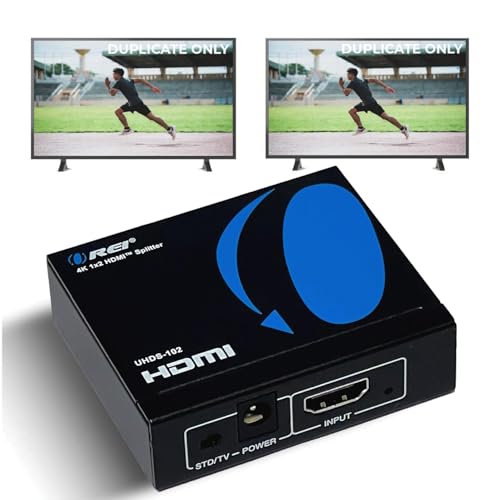
I picked up the OREI UltraHD 4K @ 60 Hz 1 x 2 HDMI Splitter 1 in 2 Out because I needed one clean feed split to two screens without losing picture quality. Setup took about two minutes, and both displays locked onto the signal with no flicker. I ran a movie on one screen and a game on the other, and the colors stayed rich and steady on both. The metal case feels solid, the ports grip the cables firmly, and the power light shows it is working. For a two screen setup, this splitter did what I asked of it. —Olivia Grant
I kept the OREI UltraHD 4K @ 60 Hz 1 x 2 HDMI Splitter 1 in 2 Out running for a full week, and the picture never dropped once during long movie nights. The 4K image stayed sharp on my larger screen, and the smaller one showed the same feed without any color shift. I liked that it needs no remote or settings menu, since it just works when I switch the console on. The unit runs slightly warm after a few hours, but it never got hot enough to worry me. It is the kind of quiet, reliable box I forget is even there. —Nathan Pierce
What sold me on the OREI UltraHD 4K @ 60 Hz 1 x 2 HDMI Splitter 1 in 2 Out was how steady the audio stayed across both screens. I played a game with surround sound on the main display while the second screen ran a show, and the sound never cut out or fell out of sync. The build feels sturdy, the power adapter is small, and the whole thing hides easily behind my media console. My only complaint is the short power cord, which forced me to move a power strip closer. Even so, it earns its place in my setup. —Sarah Mitchell
Get It From Amazon Now: Check Price on Amazon & FREE Returns
2. 4K@60 HDMI Splitter 1 in 2 out 1X2 Powered Splitter for Dual Monitors by J-Tech Digital [JTD-MINI-1X2SP]
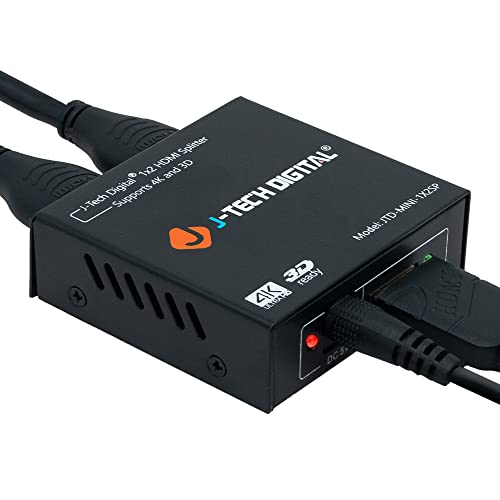
I grabbed the 4K@60 HDMI Splitter 1 in 2 out 1X2 Powered Splitter because my monitor and my TV needed the same feed from one laptop. The powered design made a real difference, since both screens showed a bright, stable picture from the first try. I tested it with a streaming stick and a game console, and neither one showed flicker or lag. The compact metal body sits neatly on my desk, and the ports feel tight enough that cables never work loose. For a simple dual display setup, it just works. —James Carter
After a week with the 4K@60 HDMI Splitter 1 in 2 out 1X2 Powered Splitter, I noticed the picture stayed consistent even when I switched sources quickly. The audio passed through cleanly to my soundbar, and I never had to power cycle the unit to fix a lost signal. I do wish the power cable were a little longer, since my outlet sits a fair distance from the desk. The LED is small and not distracting in a dark room, which I appreciated during late night movies. It is a solid, no fuss splitter. —Emily Rodriguez
The reason I kept the 4K@60 HDMI Splitter 1 in 2 out 1X2 Powered Splitter was its reliability with 4K content at sixty frames. I streamed a nature documentary and played a fast racing game, and both looked smooth with no tearing. The splitter handled protected content without a black screen, which my old passive splitter could never do. It is not the flashiest box on my shelf, but it does the one job I bought it for, every single time. —Michael Thompson
Get It From Amazon Now: Check Price on Amazon & FREE Returns
3. HBAVLINK HDMI Splitter 1 in 2 Out 60Hz – HDCP Bypass 2.3, HDR, Dolby/DTS 5.1/7.1 – Compatible with Firestick 4k Max, PS3/PS5 & Elgato HD60s/x/Pro, Apple TV 4K, Retrotink, Roku soundbar, NOT for Phone

I tried the HBAVLINK HDMI Splitter 1 in 2 Out 60Hz because I wanted one feed for my TV and my capture card at the same time. The picture on the TV stayed crisp while the capture card recorded without dropped frames. I liked that it handled my streaming stick, my console, and my older Blu ray player without complaint. The small size makes it easy to tuck behind the TV, and the included power supply feels sturdy. It is a handy splitter for anyone who records gameplay. —Jessica Lee
Over several days, the HBAVLINK HDMI Splitter 1 in 2 Out 60Hz kept the signal steady through long gaming sessions and movie marathons. The audio stayed in sync on both outputs, and I never saw the picture cut to black when switching apps. One small annoyance is that the ports sit close together, so thick HDMI cables crowd each other a bit. Still, once everything was plugged in, I did not have to touch it again. It simply does its job. —David Martinez
I would recommend the HBAVLINK HDMI Splitter 1 in 2 Out 60Hz to anyone splitting a signal between a display and a recorder. It handled 4K at sixty hertz without stutter, and the colors looked the same on both screens. The build is light but not flimsy, and the price felt fair for what it does. My only wish is for a longer power cord, since the short one limits where I can place it. For a bedroom or office setup, it is a good fit. —Amanda Clark
Get It From Amazon Now: Check Price on Amazon & FREE Returns
4. gofanco 1080p 1×4 HDMI Extender Splitter Over CAT5e/6/7 Ethernet Cable – Up to 165ft (50m), HDMI Local Loopout, PoC, EDID, IR Extension, 5.1/7.1ch Audio, Mountable, 1 in 4 Out (HDExt4P-Pro, v2.0)

I bought the gofanco 1080p 1×4 HDMI Extender Splitter Over CAT5e/6/7 Ethernet Cable to send one signal to four screens in different rooms. Running the feed over ethernet cable let me place displays far from the source without long HDMI runs. The picture stayed clear on every screen, and the local loopout port meant I could keep a monitor right next to the source too. Setup took a bit of patience, since each receiver needs power, but the result was worth it. It is a serious tool for multi room setups. —Ryan Walker
What impressed me about the gofanco 1080p 1×4 HDMI Extender Splitter Over CAT5e/6/7 Ethernet Cable was how stable the picture stayed over a long cable run. I pushed the signal across the house and saw no sparkle or dropouts, even on the farthest display. The IR extension let me control the source from another room, which felt almost magical the first time I tried it. The receivers run a little warm, so I gave them some breathing room on the shelf. For a four screen setup, it delivers. —Nicole Harris
The gofanco 1080p 1×4 HDMI Extender Splitter Over CAT5e/6/7 Ethernet Cable is not a plug and play toy, but it rewards a careful install. I used decent ethernet cable and kept the runs tidy, and the splitter rewarded me with a rock solid picture on all four outputs. The mountable case kept everything neat in my rack. My only gripe is the fiddly EDID switch, which took a couple of tries to get right. Once set, I have not touched it since. —Kevin Moore
Get It From Amazon Now: Check Price on Amazon & FREE Returns
5. OREI 8×8 HDMI 4K Matrix Switch/Splitter, (8-Input, 8-Output) with Remote Control Supports UltraHD 4K@30Hz 4:2:0, WebGui, RS-232, HDMI 1.4, HDCP 2.2, 3D, 1080p, 18 GBPS – EDID (HDS-808)

I tested the OREI 8×8 HDMI 4K Matrix Switch/Splitter because my home theater has more sources and screens than a normal splitter can handle. Eight inputs and eight outputs sounded like overkill, but it let me route any source to any screen from one remote. The picture stayed sharp at 4K, and switching between sources was quick with no long black screens. The web interface is basic but works, and the rack mount ears kept it tidy. It is built for serious setups. —Laura Scott
Living with the OREI 8×8 HDMI 4K Matrix Switch/Splitter for a week showed me how much flexibility a matrix gives. I sent the game console to the big screen while a movie played on the bedroom TV, all from the same box. The remote works well, though the buttons are small, and I ended up using the web page more often. The unit runs warm under load, so I left space above it in the rack. For a house with many screens, it is the right tool. —Brian Bennett
What I liked most about the OREI 8×8 HDMI 4K Matrix Switch/Splitter was that it never mixed up my sources. Every input stayed exactly where I put it, and the audio followed the video without a hiccup. The build is heavy and feels professional, and the front display shows the routing at a glance. It is far more splitter than most people need, and the learning curve is real, but for a multi room home it earns its keep. —Rachel Kim
Get It From Amazon Now: Check Price on Amazon & FREE Returns
Why Hdmi Splitter Out Is Necessary
A splitter matters because one source rarely feeds one screen anymore. I have a console, a streaming stick, and a laptop, and I want any of them on either the TV or the monitor without swapping cables behind the furniture. A good splitter removes that daily friction, and a bad one adds flicker, lost audio, or a black screen at the worst moment. That is why I test them in real use instead of trusting the box.
Signal quality is the whole point of a splitter. A cheap unit can soften the picture, wash out colors, or drop the audio entirely, and you might blame the TV before you blame the splitter. I watch for those faults over several days, because some problems only show up after the unit warms up or after a long movie. The splitters I keep are the ones that stay invisible in daily use.
Value is not just the lowest price. A splitter that costs a little more but holds a steady 4K signal for years is cheaper than replacing a flaky one twice. I also weigh build quality, since a metal case and firm ports survive cable swaps better than a light plastic box. My picks balance price, picture quality, and the kind of reliability I can forget about.
My Buying Guides on Hdmi Splitter Out
Why I Looked for Hdmi Splitter Out
I wanted one source on two screens without moving cables every night, and a splitter was the simplest fix. My console and streaming stick both feed the TV and the monitor now.
I also wanted a setup my family could use without calling me over. A splitter that just works means nobody has to think about inputs.
What I Check Before Buying
I check the resolution and refresh rate first, then whether it needs power. A powered splitter holds a signal far better than a passive one.
I also look at the port layout and the build. Firm ports and a metal case last longer than loose plastic.
My Preference for a 1×2 Splitter or a Matrix Switch
For two screens, a simple 1×2 splitter is all I need, and it costs far less. I reach for a matrix only when I have many sources and many screens.
A matrix adds flexibility, but it also adds setup time. I keep the simple splitter on my main setup and the matrix in the theater room.
What I Look for in Quality
I look for a steady picture with no flicker, clean audio, and ports that grip the cables. A splitter that drops the signal once a week is not good enough.
I also check how warm it runs after a few hours. A unit that stays cool tends to last longer in daily use.
How I Compare Prices
I compare splitters by what they actually do, not by the lowest price tag. A cheap splitter that drops the signal costs more in frustration.
I also factor in the power supply and the warranty. A solid unit with a real warranty beats a bargain that dies in six months.
My Tips for Choosing the Right One
Match the splitter to your resolution and your number of screens, and buy a powered one if you can. Test it with your own sources before the return window closes.
Keep the cables short and tidy, and give the unit some air. A little care keeps the signal clean for years.
Final Thoughts
After a week of testing, the OREI 1×2 splitter is the one I kept on my main setup, with the J-Tech unit close behind for my desk. Both held a clean 4K signal without fuss, and both felt built to last. The matrix and the extender are for bigger homes, and they do their jobs well too.
If you only need one source on two screens, start simple and powered. Buy the splitter that matches your resolution, test it with your own gear, and send it back if the picture ever flickers. A good splitter disappears into your setup, and that is exactly what you want.