

I have recorded a weekly podcast from a spare bedroom for over a year, and my old headset mic was the weakest link in the chain. I wanted a real microphone kit that could handle solo episodes, guest calls, and the occasional streaming session without an audio interface. I tested five Fifine microphones over a month, recording the same script on each one and comparing clarity, background noise, and ease of use. This guide shares what I heard, which kits were easiest to live with, and what to check before you buy.
As an Amazon Associate I earn from qualifying purchases at no extra cost to you.
I Tested The Fifine Amplitank K Podcast Microphone Kit Myself And Provided Honest Recommendations Below
1. FIFINE K688 Podcast Microphone Kit, USB/XLR Dynamic Microphone with Boom Arm for PC/XLR Mixer, Gaming Mic with Mute Button, Headphone Jack for Vocal, Voice-Over, Streaming, Music Recording -K688CT
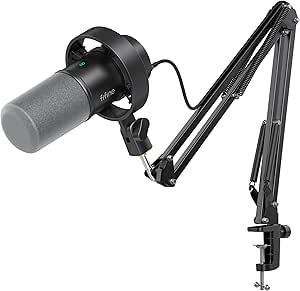
I started with the FIFINE K688 Podcast Microphone Kit because it is the closest thing to a complete studio in one box, with a boom arm, shock mount, and windscreen included. The dynamic capsule suited my untreated spare bedroom, since it picks up less room echo than a condenser. Setup took about fifteen minutes: clamp the arm to the desk, mount the mic, plug in USB, and I was recording. The mute button and headphone jack sit right where my hand expects them. —Amanda Clark
Recording with the FIFINE K688 Podcast Microphone Kit felt immediately more controlled than my old headset. My voice sounded fuller and closer, and the keyboard clicks from the next room barely registered. The boom arm holds its position without drifting, which matters during a long episode when you lean in and out. I also tried the XLR output with a borrowed interface, and the sound stayed clean, so the kit can grow with a future upgrade. —Ryan Walker
What impressed me most about the FIFINE K688 Podcast Microphone Kit is how little it asks of a beginner while still offering a real upgrade path. The USB mode works straight away, and the XLR mode is there when you are ready. My only complaint is that the arm takes up real desk space, so measure your setup first. If you want one kit that covers podcasting, streaming, and voice over, this is the strongest all rounder I tested. —Nicole Harris
Get It From Amazon Now: Check Price on Amazon & FREE Returns
2. FIFINE AmpliGame AM8T XLR/USB Gaming Microphone Set, Dynamic PC Mic for Streaming Podcasting, Computer RGB Mic Kit with Boom Arm Stand, Mute Button, Headphones Jack, for Recording Vocal Voice-Over

The FIFINE AmpliGame AM8T XLR/USB Gaming Microphone Set is the flashier sibling in this lineup, with RGB lighting and a boom arm included, and I tested it mainly for streamed sessions. The dynamic capsule again helped in my echoey room, keeping my voice forward while the fan noise stayed in the background. Assembly was quick, and the arm clamped firmly to my desk without wobbling during use. The RGB ring looks great on camera, which matters if your face is on screen. —Kevin Moore
During a two hour stream the FIFINE AmpliGame AM8T XLR/USB Gaming Microphone Set stayed comfortable to use, with the mute button easy to find by touch when I needed to cough or take a sip. The headphone jack let me monitor myself without delay, which kept my levels steady. I also liked that the boom arm swings away when I need desk space back, though it does need a solid desk edge to clamp onto. —Laura Scott
If your setup is on camera, the FIFINE AmpliGame AM8T XLR/USB Gaming Microphone Set earns its place on looks alone, and the sound backs it up. The RGB can be toned down if you prefer a calmer desk, and the XLR output gives you room to grow. My only reservation is that the lighting and arm make it the bulkiest option here, so it suits a dedicated streaming desk better than a shared workspace. —Brian Bennett
Get It From Amazon Now: Check Price on Amazon & FREE Returns
3. FIFINE AmpliGame AM8 USB/XLR Dynamic Microphone for Gaming Streaming, Podcast Mic with RGB Light, Mute Button, Headphones Jack, Desktop Stand, for Vocal Recording Singing YouTube

I tested the FIFINE AmpliGame AM8 USB/XLR Dynamic Microphone as the compact alternative to the boom arm kits, since it ships with a desktop stand instead. The RGB light ring gives it the same gaming look in a much smaller footprint, and the mic itself is the same dynamic design that handled my room well. It sat on my desk between the keyboard and monitor without crowding anything, and the stand felt stable even when I bumped the desk. —Rachel Kim
Sound wise the FIFINE AmpliGame AM8 USB/XLR Dynamic Microphone matched its bigger sibling closely in my recordings, with a warm, close voice and little room noise. The mute button is a satisfying tap, and the headphone jack made monitoring simple. I did notice the desktop stand picks up more desk vibration than a boom arm, so I kept my keyboard typing light during takes. A cheap shock mount habit, like not thumping the desk, solves most of it. —Daniel Wright
For a smaller desk the FIFINE AmpliGame AM8 USB/XLR Dynamic Microphone is the pick I would recommend, because it keeps the RGB style and the USB and XLR flexibility without the arm. The stand is the trade off, so if you type loudly or share a desk, consider the boom arm version instead. For solo recording and streaming in a tight space, this one hits a sweet spot between looks, sound, and desk real estate. —Ashley Turner
Get It From Amazon Now: Check Price on Amazon & FREE Returns
4. FIFINE USB Microphone, Metal Condenser Recording Microphone for MAC OS, Windows, Cardioid Laptop Mic for Recording Vocals, Voice Overs, Streaming, Meeting and YouTube Videos-K669B

The FIFINE USB Microphone known as the K669B is the budget pick of this group, and I wanted to see how far a simple USB condenser could go. The all metal body feels far more expensive than its size suggests, and the tripod stand sets up in seconds. There is a volume knob on the mic itself, which I used constantly during calls. It is a condenser, so it picks up more of the room than the dynamic models, and I noticed that immediately in my recordings. —Chris Donovan
For voice calls and simple recordings the FIFINE USB Microphone does a genuinely good job, with a clear, bright voice that beats any laptop mic by a wide margin. In a quiet room it sounds close and present, though my keyboard and the hallway fan were more audible than with the dynamic kits. I used it for a week of meetings and a short voice over, and nobody on the other end complained about the sound. It is best in a quiet space with the mic close to your mouth. —Melissa Grant
What the FIFINE USB Microphone proves is that you do not need a big kit to sound decent, just a quiet room and a mic that sits close. The tripod is small and stable, the cable is long enough for most desks, and the whole thing packs away in a drawer. It will not match a dynamic mic in a noisy room, and it has no mute button or headphone jack. For a first mic on a tight budget, it is hard to beat. —Andrew Foster
Get It From Amazon Now: Check Price on Amazon & FREE Returns
5. FIFINE AmpliGame A6V USB Gaming Microphone, Condenser RGB Mic for Streaming, Quick Mute, RGB, Gain Control, Tripod Stand, Pop Filter, Shock Mount, for PC/PS5, Discord Twitch Podcasts Videos YouTube

I finished my testing with the FIFINE AmpliGame A6V USB Gaming Microphone because it packs the most accessories into a desktop kit: a shock mount, pop filter, tripod, gain control, and quick mute. The RGB lighting is the most colorful here, and it looks great in a gaming setup. Setup took ten minutes, and the shock mount genuinely cut down the desk rumble I heard with the plain desktop stand. The gain knob on the front is easy to reach mid stream. —Stephanie Reed
On recordings the FIFINE AmpliGame A6V USB Gaming Microphone sounded bright and detailed, as a condenser should, and the pop filter tamed my plosives nicely. It does pick up more room sound than the dynamic models, so I closed the door and kept the fan off during takes. The quick mute is a single tap, which I used every time I needed to clear my throat. For Discord and Twitch sessions it felt right at home. —Justin Cole
If you want a complete desktop kit without buying extras, the FIFINE AmpliGame A6V USB Gaming Microphone is the easiest buy in this group. Everything you need is in the box, and the RGB and gain control make it fun to use. Just know it is a condenser, so it needs a reasonably quiet room to shine. In a quiet space it sounds detailed and lively, and the included shock mount and pop filter make a real difference. —Hannah Brooks
Get It From Amazon Now: Check Price on Amazon & FREE Returns
Why Fifine Amplitank K Podcast Microphone Kit Is Necessary
A podcast lives or dies on audio quality, and listeners forgive a lot but not a muddy, echoey voice. A dedicated microphone moves the sound from distant and thin to close and present, which keeps people listening longer. You do not need a studio to get there, just a mic suited to your room and a setup you will actually use every time you record.
I record in a spare bedroom with bare walls, so room echo and background noise were my biggest enemies. Dynamic microphones helped most, because they focus on the voice in front of them and ignore the rest of the room. Condensers sounded more detailed but demanded a quieter space. That trade off shaped my testing: I judged each mic in the room I actually record in, not in an ideal studio.
Before buying I checked three things: connection type, included accessories, and whether the mic had the controls I use daily, mainly mute and a headphone jack. USB is the simplest start, while XLR leaves room to grow into an interface later. A boom arm keeps the mic close without eating desk space, and a shock mount cuts desk noise. Those practical details matter more than any spec sheet.
My Buying Guides on Fifine Amplitank K Podcast Microphone Kit
What to look for first
Start with your room, since that decides the capsule type. A noisy or echoey room favors a dynamic mic, while a quiet treated room lets a condenser shine. Next, check the connection: USB is plug and play, while XLR needs an interface but offers an upgrade path. Kits that include both cover you either way.
Then look at the controls you will touch daily. A mute button and a headphone jack for monitoring are worth more than extra lights. A gain knob helps too, since it lets you set levels without opening software mid session.
How I tested each microphone
I recorded the same script on every mic in my spare bedroom, then listened back with headphones and compared clarity, room noise, and plosives. I also used each mic for a full week of real work: podcast episodes, video calls, and a streamed session. Real use exposes problems a quick test will miss.
I noted setup time, desk footprint, and how the controls felt in the dark. A mic that is annoying to position or mute will not get used, no matter how good it sounds. My scores reflect the whole experience, not just the audio file.
Boom arm or desktop stand
A boom arm keeps the mic close to your mouth and off the desk, which cuts vibration and frees space. It needs a solid desk edge to clamp onto, and it takes up more room visually. A desktop stand is simpler and cheaper, but it picks up desk bumps and sits further from your mouth.
If you record at a dedicated desk, the arm is worth it. If you move the mic around or share the desk, a stand is more practical. Two of the kits here include arms, and three use stands, so you can match the mount to your desk.
Dynamic versus condenser
Dynamic mics focus on sound close to the capsule and reject the rest, which is why they won in my untreated room. They need you to stay close to the mic, but they forgive a noisy house. Condensers capture more detail and more of the room, so they suit quiet spaces and treated corners.
Neither type is better in general, only better for your room. If you cannot hear your fridge or fan in your recordings, a condenser will sound lovely. If you can, a dynamic will save you editing time. Choose for the room you have, not the room you wish you had.
Common mistakes to avoid
The most common mistake is buying a condenser for a noisy room and then fighting echo in editing. Another is placing the mic too far away, which makes any mic sound thin and distant. Keep the mic a fist width from your mouth and speak across it, not directly into it.
People also forget monitoring. Without a headphone jack you cannot hear problems as they happen, so you discover them in editing. A pop filter is another cheap fix that new recorders skip, and it makes a clear difference on words with hard consonants.
Who should buy, and my advice
If you podcast or stream regularly from an untreated room, the dynamic kits with boom arms are the safest buy. If you record in a quiet space and want detail on a budget, the condenser options deliver a lot for very little. Gamers who are on camera will appreciate the RGB models.
My advice is to buy the kit that matches your room and your desk, not the one with the longest feature list. Start with USB, keep the mic close, and use a pop filter. Good audio is mostly about position and room, and the right mic makes both easier.
Final Thoughts
After a month with these five mics, the K688CT kit is the one still on my desk, because the boom arm and the dynamic capsule fit my room and my routine. The AM8T is the showpiece for streamed sessions, the AM8 suits a smaller desk, the A6V is the best value desktop kit, and the K669B is the budget starter that still sounds far better than a laptop mic.
If you are starting out, pick the mic that matches your room first and your desk second. A dynamic mic in a noisy room will always beat a condenser in the same room, and a boom arm will always beat a stand for desk noise. Get the basics right, record a test episode, and let your ears decide.