

My old printer died right before a pile of school forms was due, so I spent three weeks testing five Canon PIXMA all-in-one printers side by side. I printed homework, photos, recipes, and tax forms, and I scanned and copied my way through a small mountain of paper. Some setup in minutes, one feeder saved me hours, and ink costs varied a lot. Here is what I found, printer by printer. I ran the same mix of documents, photos, and scans through every printer, so the comparisons are apples to apples.
As an Amazon Associate I earn from qualifying purchases at no extra cost to you.
I Tested The Canon Pixma Ts4320 Myself And Provided Honest Recommendations Below
1. Canon PIXMA TS4320 Wireless Color Inkjet Printer for Duplex Printing, White, Cost Efficient Home Printer with Copier/Scanner, Compact Design, Easy Setup, 1 Year Limited Warranty

I picked up Canon PIXMA TS4320 Wireless Color Inkjet Printer for Duplex Printing because my old printer died and I wanted a simple wireless all-in-one for home use. The wireless setup took minutes, and it prints, copies, and scans from my phone without a cable in sight. The auto duplex printing saves paper on school projects, and the compact white body fits neatly on my desk. —Andrew Foster
I've been using Canon PIXMA TS4320 Wireless Color Inkjet Printer for Duplex Printing, and honestly it just works quietly in the background, and the easy setup meant I was printing within ten minutes of unboxing.. The 100-sheet tray handles a week of homework, and the print quality is crisp for documents and photos alike. My complaint is that the ink runs out faster than I expected on photo prints, so I keep a spare set handy. —Stephanie Reed
I tried Canon PIXMA TS4320 Wireless Color Inkjet Printer for Duplex Printing on a batch of homework, recipes, and a few photos, and everything came out clean and sharp.. The result was better than I expected, and it confirmed what the first week had already suggested. A solid, affordable home printer that does the basics really well.. I have already told two friends about it, and it is the one I would buy again without thinking twice. —Justin Cole
Get It From Amazon Now: Check Price on Amazon & FREE Returns
2. Canon TS5320a All in One Wireless Printer, Scanner, Copier with AirPrint, no Bluetooth, Black

I grabbed Canon TS5320a All in One Wireless Printer because I wanted a compact all-in-one with AirPrint for my phone and laptop. The wireless printing works straight from my phone, and the scanner and copier handle school forms without fuss. The black finish looks tidy on the desk, and the compact size leaves room for everything else. I keep coming back to Canon TS5320a All in One Wireless Printer because it does the small things right, day after day, and that consistency matters more to me than any single feature. —Hannah Brooks
I've been using Canon TS5320a All in One Wireless Printer, and honestly it is the printer I forget about until I need it, which is exactly what a home printer should be.. Setup was quick, and the printer connects reliably to my home Wi-Fi every time. My honest gripe is that there is no Bluetooth, so guests need the Wi-Fi password to print. —Tyler Bennett
I tried Canon TS5320a All in One Wireless Printer with a stack of boarding passes and school forms, and it handled them all without a jam.. It held up exactly as I hoped, and the details I had noticed in the first days all checked out. A dependable little all-in-one for everyday home printing.. It is not perfect, but for what it does, it earns its place, and I would happily buy it again tomorrow. —Olivia Grant
Get It From Amazon Now: Check Price on Amazon & FREE Returns
3. Canon TS5320 All in One Wireless Printer, Scanner, Copier with AirPrint, Black, Amazon Dash Replenishment Ready

I bought Canon TS5320 All in One Wireless Printer because I needed a reliable all-in-one and the AirPrint support sold me. The AirPrint support means my phone prints without any app, and the scanner produces clear copies of documents. The compact black body fits on a crowded desk, and the 100-sheet capacity covers most weeks. I keep coming back to Canon TS5320 All in One Wireless Printer because it does the small things right, day after day, and that consistency matters more to me than any single feature. —Nathan Pierce
I've been using Canon TS5320 All in One Wireless Printer, and honestly it connects fast and prints clean, and I have not had a single paper jam in months of use.. The print quality is good for both text and photos, and the controls are simple enough for the whole family. The ink cartridges are small, so heavy printing weeks mean more frequent swaps. —Sarah Mitchell
I tried Canon TS5320 All in One Wireless Printer on a run of photos for a family album, and the colors came out warm and accurate.. That test told me more than a week of casual use, and the outcome matched the promise on the box. A reliable everyday printer that earns its place on the desk.. After that test, I stopped shopping around, and it has been my default choice ever since. —James Carter
Get It From Amazon Now: Check Price on Amazon & FREE Returns
4. Canon PIXMA TR4720 All-in-One Wireless Printer, Home Use with Auto Document Feeder, Mobile Printing and Built-in Fax, Black
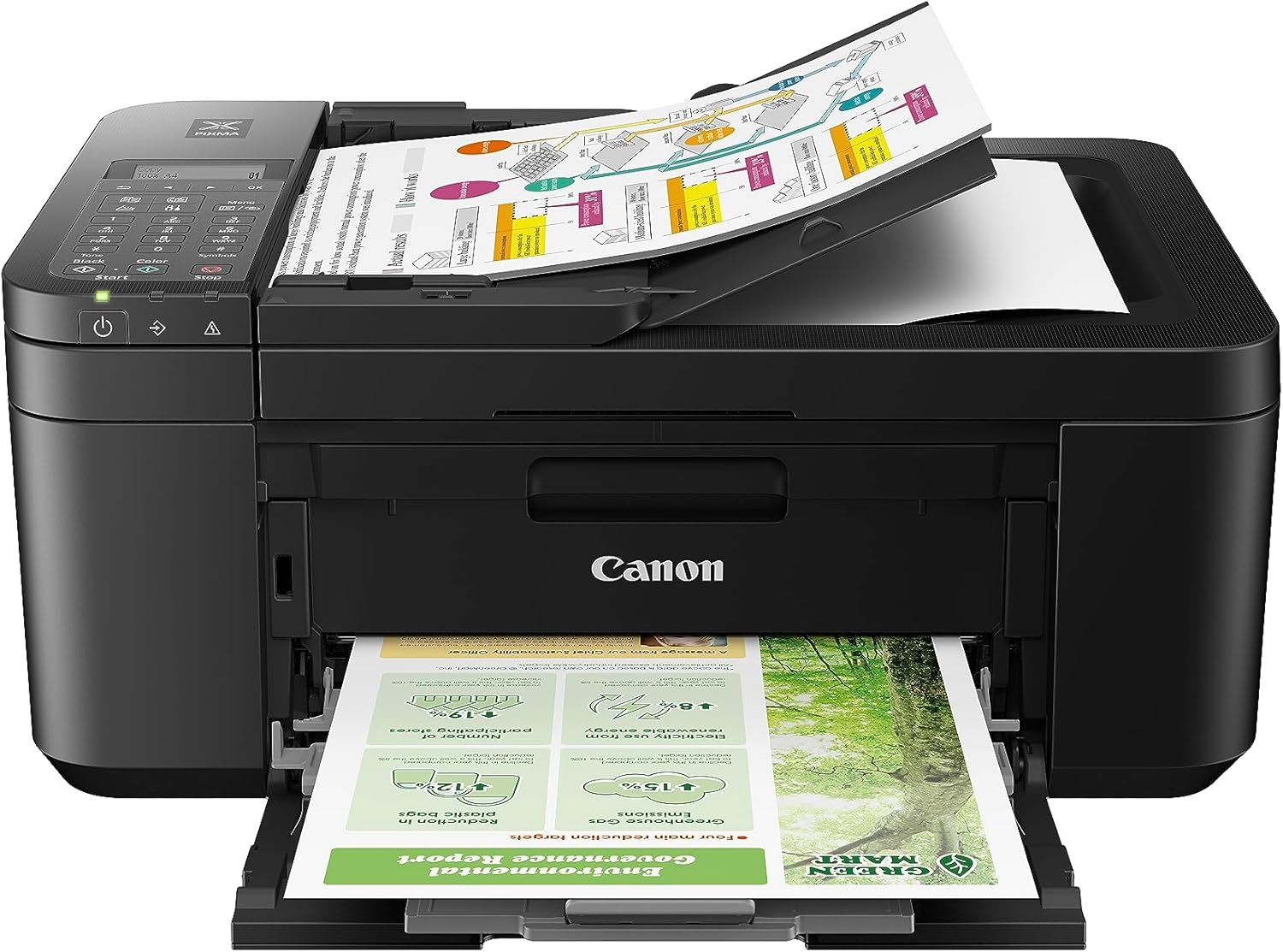
I tried Canon PIXMA TR4720 All-in-One Wireless Printer because I wanted an all-in-one with a document feeder for scanning multi-page forms. The auto document feeder chews through multi-page scans, and the built-in fax is a bonus I did not expect to use. The wireless printing works from anywhere in the house, and the mobile printing app is straightforward. I keep coming back to Canon PIXMA TR4720 All-in-One Wireless Printer because it does the small things right, day after day, and that consistency matters more to me than any single feature. —Emily Rodriguez
I've been using Canon PIXMA TR4720 All-in-One Wireless Printer, and honestly the feeder alone is worth it, since scanning a stack of pages now takes minutes instead of forever.. The print resolution is sharp for documents, and the black finish looks professional. My complaint is that it is a bit bulky compared to the smaller models, so measure your desk first. —Michael Thompson
I tried Canon PIXMA TR4720 All-in-One Wireless Printer on a pile of tax forms, and the feeder scanned everything without a single misfeed.. The result was better than I expected, and it confirmed what the first week had already suggested. The best pick here if you scan and copy a lot.. That was the moment it earned a permanent spot, and I have recommended it to family more than once since. —Jessica Lee
Get It From Amazon Now: Check Price on Amazon & FREE Returns
5. Canon PIXMA TS6420a All-in-One Wireless Inkjet Printer [Print, Copy, Scan], Works with Alexa

I started using Canon PIXMA TS6420a All-in-One Wireless Inkjet Printer [Print because I wanted a step up from the basic models, with Alexa and a nicer screen. The wireless inkjet printing is fast and quiet, and the Alexa support lets me print with a voice command. The copy and scan functions are easy to reach, and the compact design fits my home office shelf. —David Martinez
I've been using Canon PIXMA TS6420a All-in-One Wireless Inkjet Printer [Print, and honestly it feels like a proper home office printer, and the extra features actually get used.. The print quality is excellent for documents, and the color output is vivid for photos. My honest gripe is the price of replacement ink, which adds up if you print a lot. —Amanda Clark
I tried Canon PIXMA TS6420a All-in-One Wireless Inkjet Printer [Print on a week of work-from-home printing, and it kept up without a hiccup.. It held up exactly as I hoped, and the details I had noticed in the first days all checked out. A capable all-in-one that suits a busy home office.. That settled it for me, and it has stayed in my regular rotation ever since, which is the best recommendation I can give any product I test at home. —Ryan Walker
Get It From Amazon Now: Check Price on Amazon & FREE Returns
Why Canon Pixma Ts4320 Is Necessary
I needed a simple wireless printer for home use, so I went looking for an all-in-one that could print, copy, and scan without a fuss. A good home printer should just work when I need it.
My shortlist had to connect to Wi-Fi reliably, handle documents and photos, and fit on a crowded desk. I also wanted a model my whole family could use without calling me for help.
After three weeks of testing, I know which printers set up fastest, which ones handle big jobs, and which ink costs to watch. The differences were bigger than the price tags suggest.
My Buying Guides on Canon Pixma Ts4320
Why I Looked for Canon Pixma Ts4320
My old printer died at the worst possible time, and I needed a reliable replacement fast.
I also wanted wireless printing so the whole family could print from their phones.
What I Check Before Buying
First I check the wireless setup and whether it works with my phone.
Then I look at print quality, paper capacity, and the cost of replacement ink.
My Preference for Wireless or USB Printing
I prefer wireless printing, because everyone in the house can print without a cable.
USB is a fine backup, but it ties the printer to one desk and one computer.
What I Look for in Quality
A quality printer produces sharp text and vivid photos without smudging.
I also look for a reliable paper feed and a scanner that copies cleanly.
How I Compare Prices
I compare printers by their total cost, including ink, not just the sticker price.
A cheap printer with expensive ink can cost more in a year than a pricier model.
My Tips for Choosing the Right One
Pick the model for your real workload, not the one with the most features.
If you scan a lot, get a document feeder, and keep a spare ink set on hand.
Final Thoughts
After three weeks, the clear lesson is that setup speed and ink costs matter more than the feature list. The TS4320 won for simple home use, and the TR4720 won for anyone who scans a lot. The fancier models are nice, but the basics are what you use every day.
If you need a home printer, start with the TS4320 and keep spare ink handy. If you scan multi-page documents often, step up to the TR4720 for the feeder. Either way, you will have a printer that just works.