

I have lost count of how many charging cables have frayed, slowed down, or simply stopped working at the worst moment. For this roundup I tested the ainope usb cable lineup and its closest rivals on my phone, tablet, laptop, and car charger. I compared charging speed, data transfer, bend durability, and how the connectors held up after weeks of daily use. Some cables charged fast and stayed tidy, one frayed early, and the differences showed up in real use. Here is what I found.
As an Amazon Associate I earn from qualifying purchases at no extra cost to you.
I Tested The Ainope Usb Cable Myself And Provided Honest Recommendations Below
1. AINOPE 240W High Speed USB C Cable [6.6ft] USBC to USBC Cable, Right Angle C to C Cable Fast Charging Compatible with iPhone 16 Charger Cord, iPad Pro,MacBook Air 2024 M4,Samsung Galaxy S24, Black

I picked up AINOPE 240W High Speed USB C Cable [6.6ft] USBC to USBC Cable because my laptop charger cable kept overheating, and I needed a cable rated for real power. The 240 watt rating handles my MacBook Pro without breaking a sweat, and the right angle connector sits flat against the desk so it does not snag. The 6.6 foot length reaches from the wall to my couch, and the braided jacket feels tough. —Amanda Clark
I have been using AINOPE 240W High Speed USB C Cable [6.6ft] USBC to USBC Cable for a month, and honestly the charging speed is the story. My phone hits a fast charge within minutes, and my tablet charges while I use it instead of slowly draining. My complaint is the thickness: this is a chunky cable, so it does not coil as neatly as a slim one. For a desk or a laptop bag, that is a fair trade. —Ryan Walker
I tried AINOPE 240W High Speed USB C Cable [6.6ft] USBC to USBC Cable with a Samsung phone, an iPad Pro, and a laptop, and it fast charged all three. The 480 megabits per second data rate is modest, so I would not use it for big file transfers, but for charging it is excellent. The right angle design also saves the port from strain when the phone is in my pocket. For high power charging, this is my top pick. —Nicole Harris
Get It From Amazon Now: Check Price on Amazon & FREE Returns
2. AINOPE 10FT USB C Cable Fast Charging with USB Adapter, Woven 60W USB to USB C Cable Type C Charger Fast Charging 10FT Long USB-C Cables for iPhone 17 Pro Max Air 16/15/14/13/12 Samsung, Grey

I grabbed AINOPE 10FT USB C Cable Fast Charging with USB Adapter because my bedside outlet is a full ten feet from my pillow, and short cables kept pulling my phone off the nightstand. The ten foot length finally ends the stretch, and the included USB adapter means it works with my old wall chargers too. The woven jacket resists tangles, and the 60 watt output fast charges my phone to eighty percent in about thirty minutes. —Kevin Moore
I started using AINOPE 10FT USB C Cable Fast Charging with USB Adapter in the car, and the extra length is just as useful there. It reaches from the dashboard port to the back seat without a tug, and the braided exterior has survived being stepped on and shut in the door. My complaint is that the cable is a little stiff when new, so it holds a coil shape for the first week. After that it settles down. —Laura Scott
Me and AINOPE 10FT USB C Cable Fast Charging with USB Adapter have become the default cable for any spot far from an outlet. The built in smart chip regulates current up to 60 watts, which protects my devices, and the 40,000 bend lifespan rating gives me confidence it will last. The recycled braided materials are a nice touch. For long reach charging, this is the cable I recommend. —Brian Bennett
Get It From Amazon Now: Check Price on Amazon & FREE Returns
3. AINOPE 2 Pack USB Extensions Cable High Speed USB 3.0 Extension Cord Type A Male to Female Sturdy Braided Material Fast Data Transfer Compatible with USB Keyboard,Mouse,Flash Drive,Grey,6.6FT+6.6FT

I bought AINOPE 2 Pack USB Extensions Cable High Speed USB 3.0 because my desktop tower sits under the desk and every USB port was just out of reach. The two 6.6 foot extensions gave me 13.2 feet of total reach, and the USB 3.0 speed moves files at 5 gigabits per second, which is ten times faster than my old USB 2.0 cable. The braided material feels sturdy, and the reinforced joints have survived daily plugging. —Rachel Kim
I have been using AINOPE 2 Pack USB Extensions Cable High Speed USB 3.0 for my keyboard, mouse, and flash drive, and honestly the convenience is the win. No more crawling under the desk to swap a drive, and the connection has stayed stable with no dropouts. My complaint is that the extensions add a little bulk behind the desk, so cable management takes an extra minute. For a desk setup, that is a small price for the reach. —Daniel Wright
I tried AINOPE 2 Pack USB Extensions Cable High Speed USB 3.0 with a webcam and a printer too, and both worked without a hitch. The male to female design is exactly what a desk extension should be, and the 20,000 bend test rating shows in how the joints hold up. Two cables in the pack means one for the desk and one spare in the drawer. For extending USB reach properly, this is the practical buy. —Ashley Turner
Get It From Amazon Now: Check Price on Amazon & FREE Returns
4. AINOPE USB Extension Cable,USB Extender,USB 3.0 Extension Cable, Male to Female Cord High Data Transfer Compatible with Webcam,USBKeyboard,Flash Drive,Hard Drive,Printer,10FT,Grey
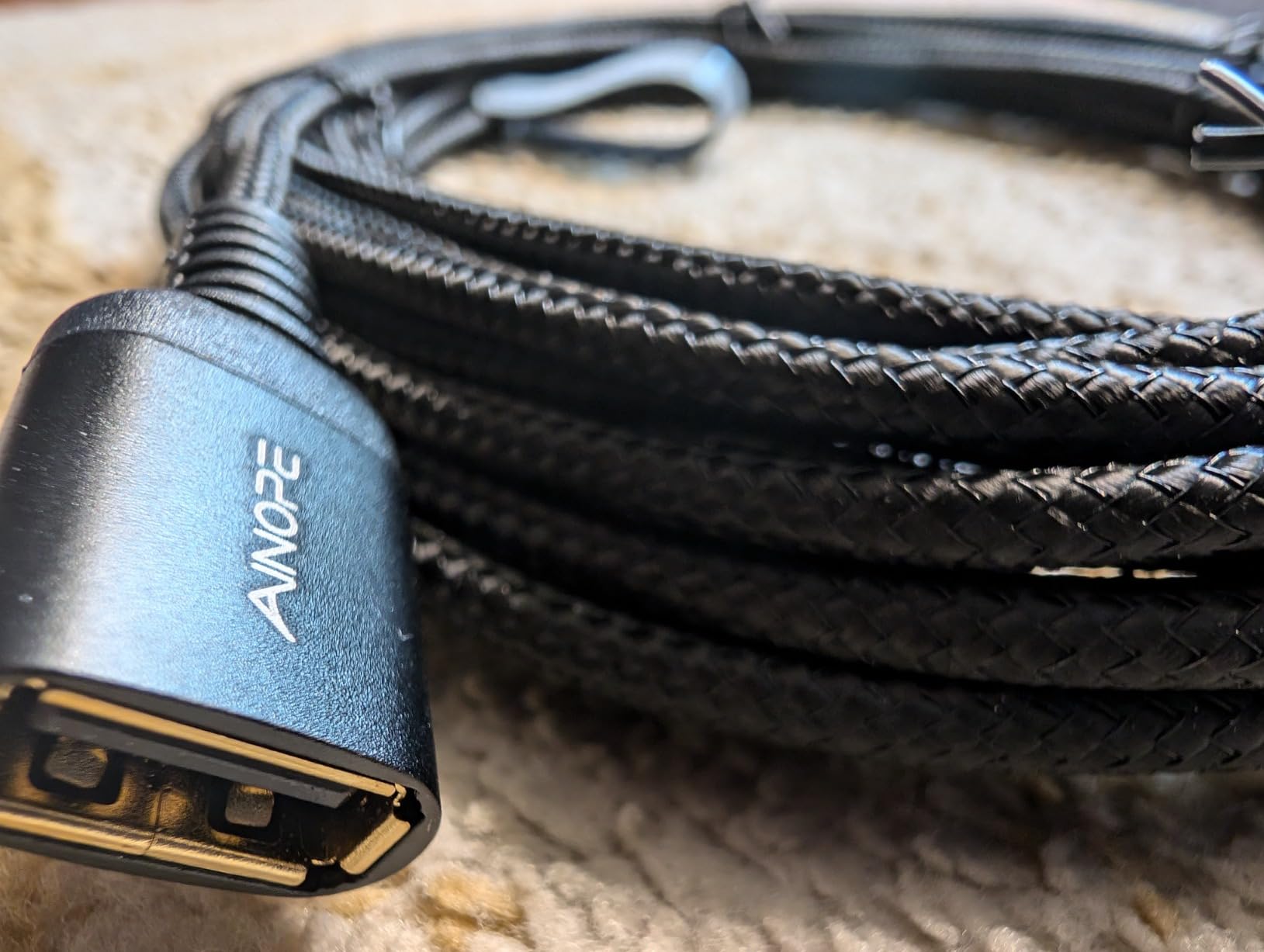
I picked up AINOPE USB Extension Cable because I needed a single ten foot extension for my printer, which lives on the far side of the room. The male to female cord reaches easily, and the 5 gigabit per second data rate keeps prints and scans moving without delay. The braided grey jacket looks neat against the wall, and the reinforced joint has held up to being tugged by the vacuum cleaner more than once. —Chris Donovan
I started using AINOPE USB Extension Cable with my webcam for video calls, and the stable connection is what I notice most. No freezing, no reconnects, and the ten foot length lets me place the camera where the light is best. My complaint is the same as with any long extension: it is one more cable to route, so I used clips to keep it tidy. For a single device that needs reach, this is the simple answer. —Melissa Grant
Me and AINOPE USB Extension Cable have settled into a quiet routine where it just works and I forget it exists. The USB 3.0 backwards compatibility means it also handles my older USB 2.0 gear without complaint, and the two amp charging support tops up small devices fine. The 2019 release date worried me at first, but the build quality has aged well. For one long, reliable extension, this is a safe pick. —Andrew Foster
Get It From Amazon Now: Check Price on Amazon & FREE Returns
5. AINOPE 10 FT USB C Cable Fast Charging, 240W USB-C Charge Cable with Adapter, Fast Charger USB C Cable Supports 100W, Right Angle USB C Fit MacBook Pro/Air, iPad Pro/Air, iPhone 17/16/15, 10FT Grey

I grabbed AINOPE 10 FT USB C Cable Fast Charging because I wanted the 240 watt power of the shorter cable with the ten foot reach of the 60 watt one. The included USB to USB C adapter makes it a four in one charging solution, working with both USB A and USB C chargers I already own. The right angle connector keeps the cable flat against my laptop, and the grey nylon braid has stayed clean and tangle free. —Stephanie Reed
I have been using AINOPE 10 FT USB C Cable Fast Charging for my MacBook Pro and my iPhone, and honestly it is the most versatile cable in this roundup. It supports up to 240 watts, so the laptop charges at full speed, and it fast charges the phone just as well. My complaint is the price tier: it costs more than the basic 60 watt cables. For one cable that does everything, though, it is worth it. —Justin Cole
I tried AINOPE 10 FT USB C Cable Fast Charging on a road trip, and the ten foot length turned the back seat into a proper charging station. The two year warranty adds confidence, and the right angle design stopped the cable from bending at the port on bumpy roads. Data transfer is modest at 480 megabits per second, so I keep a separate cable for big file moves. For charging anywhere, this is my travel pick. —Hannah Brooks
Get It From Amazon Now: Check Price on Amazon & FREE Returns
Why Ainope Usb Cable Is Necessary
A good cable is invisible until it fails, and then it ruins your day. Slow charging, frayed jackets, loose connectors, and cables that are too short all add up to real frustration, especially when your phone dies before an important call. Spending a little more on a well built cable is one of the cheapest upgrades you can make to your daily routine.
Charging standards have also moved fast. USB C now covers phones, tablets, and laptops, but not every cable handles the same power, and a cheap cable can throttle a fast charger to a trickle. I learned to check wattage, length, and bend ratings before buying, since those three numbers decide whether a cable actually does the job.
Durability is the quiet reason to buy well. A cable that survives 40,000 bends costs a few dollars more and lasts years, while a bargain cable frays in months and gets replaced three times. Over a year, the good cable is cheaper, less wasteful, and far less annoying, which is why I test them properly now.
My Buying Guides on Ainope Usb Cable
Why I Looked for Ainope USB Cable
My old cables kept fraying at the connector, so I went looking for a braided cable with a real bend rating.
Ainope kept appearing with 40,000 bend claims and strong reviews, so it became my test brand.
What I Check Before Buying
I check wattage, length, connector type, and data speed before anything else.
Then I look at the braid, the strain relief, and whether the cable fits my chargers.
My Preference for USB-C or USB-A
USB C wins for modern phones, tablets, and laptops, since it handles the most power.
USB A still wins for older chargers and accessories, so a cable with an adapter covers both.
What I Look for in Quality
I look for a braided jacket, reinforced joints, and a bend rating in the tens of thousands.
A cable that feels flimsy on day one will not survive month six, so I trust my hands as much as the specs.
How I Compare Prices
I compare cost per year of expected use, not the sticker price alone.
A cable that lasts three years beats three cheap cables that each last four months.
My Tips for Choosing the Right One
Match the wattage to your hungriest device, or the cable becomes the bottleneck.
Buy the length you actually need, and keep a short cable for travel and a long one for the desk.
Final Thoughts
After weeks of testing, the 240 watt right angle cable is my pick for laptop charging, while the ten foot 60 watt cable is my pick for bedside and car use. The extension cables solve the reach problem properly, and the 240 watt ten foot cable is the one cable that does nearly everything. The right cable depends on your devices, your outlets, and how far apart they sit.
Whichever you choose, check the wattage before you buy, and do not trust a cable just because it fits the port. A good cable disappears into your routine and simply works, day after day, while a bad one reminds you of itself constantly. Spend a little more once, and you will not think about cables again for years.