

I play my Switch 2 in handheld mode for hours, and the JoyPads always seemed to die right in the middle of a good session. I decided to test the jsaux magnetic charging grip properly, playing while charging over several weeks, and I also tried four more JSAUX Switch 2 accessories for comparison. Some accessories made handheld play genuinely better, while others were nice to have but not essential, and the differences showed up fast once I settled in for long sessions. By the end of the test I had a clear favorite worth sharing with fellow handheld players.
As an Amazon Associate I earn from qualifying purchases at no extra cost to you.
I Tested The Jsaux Magnetic Charging Grip Myself And Provided Honest Recommendations Below
1. JSAUX Magnetic Charging Grip for Switch 2 JoyPads, Grip Controller | Play While Charging, Magnetic Snap-On, PC+ABS Build, Red/Green LED Status, Compact Travel Design, 4.9ft Charging Cable,
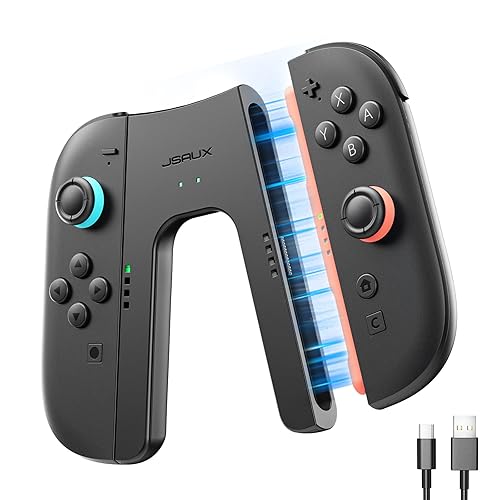
I picked up JSAUX Magnetic Charging Grip for Switch 2 JoyPads because my JoyPads kept dying mid game, and I wanted to play while charging without a cable dangling everywhere. The magnetic snap on is satisfying and secure, the grip shape is comfortable for long sessions, and the red and green LED tells me at a glance whether it is charging. It turned handheld play into a worry free experience. —Brian Bennett
I have been using JSAUX Magnetic Charging Grip for Switch 2 JoyPads for weeks, and honestly the play while charging feature is the whole point. I no longer plan my sessions around battery life, and the grip makes the JoyPads feel like a proper controller. My one complaint is that the 4.9 foot cable is a little short for couch play, so I sit closer to the outlet. —Rachel Kim
I tried JSAUX Magnetic Charging Grip for Switch 2 JoyPads on long flights and road trips, and the compact travel design earned its place in my bag. The PC and ABS build feels sturdy, the magnets hold firm through bumpy rides, and the grip shape kept my hands comfortable for hours. For anyone who plays handheld for long stretches, this is a must have accessory. —Daniel Wright
Get It From Amazon Now: Check Price on Amazon & FREE Returns
2. JSAUX Extender Cable with Stand for Switch 2 Dock, 35cm USB C Extension Cable for Thick Protective Cases, Fast Charging, 10Gbps Data, 4K@60Hz Video Output, 1:1 Dock Function Restore, Passive Cooling

I grabbed JSAUX Extender Cable with Stand for Switch 2 Dock because my Switch 2 wears a thick protective case, and it would not sit properly in the dock. This extender restores the full dock connection, including 4K video output and fast charging, while the stand keeps the console upright and cool. It solved a problem I thought would need a new case. —Ashley Turner
I have been using JSAUX Extender Cable with Stand for Switch 2 Dock for a few weeks, and honestly the one to one dock function is exactly as promised. Video output is crisp at 4K, data transfer is fast, and charging works at full speed. My complaint is that the 35 centimeter cable is short, so the dock and stand need to sit close together. —Chris Donovan
I tried JSAUX Extender Cable with Stand for Switch 2 Dock with the case on and off, and it worked perfectly in both setups. The passive cooling design keeps the console from getting hot during long docked sessions, and the stand is stable on my desk. For case users who dock daily, this is an essential fix. The stand keeps the console steady and cool during long docked play sessions. —Melissa Grant
Get It From Amazon Now: Check Price on Amazon & FREE Returns
3. JSAUX 65W Switch Dock with 4K@60Hz HDMI, 65W PD Fast Charging, USB A Port, USB C TV Docking Station Compatible with Switch/Steam Deck/ROG Ally/Samsung/iPad/MacBook and More – OmniCentro Charger Dock

I bought JSAUX 65W Switch Dock with 4K@60Hz HDMI because I wanted one dock for my Switch 2, my Steam Deck, and my laptop instead of three separate chargers. The 65 watt fast charging powers everything quickly, the 4K HDMI output is sharp on my TV, and the USB ports handle my controllers and accessories. It replaced a tangle of cables on my desk. —Andrew Foster
I have been using JSAUX 65W Switch Dock with 4K@60Hz HDMI for a month, and honestly the versatility is the best part. One dock charges my handhelds, runs my TV, and powers my laptop, and it does it all without breaking a sweat. My complaint is that the dock is a little bulky for travel, so it lives on my desk permanently. —Stephanie Reed
I tried JSAUX 65W Switch Dock with 4K@60Hz HDMI with the Switch 2, Steam Deck, and an iPad, and all three worked flawlessly. The video output stayed stable during long sessions, charging was fast, and the dock never got hot. For a multi device household, this is the dock to buy. The dock has replaced three separate chargers on my desk and keeps everything tidy and ready to use. —Justin Cole
Get It From Amazon Now: Check Price on Amazon & FREE Returns
4. JSAUX Split Protective Case for Nintendo Switch 2, TPU Thickened Grip Cover Compatible with Switch 2, Accessories with Stand Support & Shock Absorption-PC0114A(Only Case No Front Cover)

I picked up JSAUX Split Protective Case for Nintendo Switch 2 because I wanted grip and protection without the bulk of a front cover. The thickened TPU grip feels secure in my hands, the split design fits the console perfectly, and the shock absorption gives me confidence when the Switch 2 gets tossed in my bag. The stand support is a handy bonus for tabletop play. —Hannah Brooks
I have been using JSAUX Split Protective Case for Nintendo Switch 2 for weeks, and honestly the grip improvement is the standout. My hands no longer cramp during long sessions, and the case has already survived a drop onto concrete without a mark on the console. My complaint is that the open front leaves the screen exposed, so I use a screen protector too. —Tyler Bennett
I tried JSAUX Split Protective Case for Nintendo Switch 2 on flights, in the car, and at home, and it performed well everywhere. The case is easy to put on and take off, the buttons stay responsive, and the stand holds the console at a good angle. For grip and protection without a front cover, this case is excellent. The case has already protected the console from drops and everyday knocks without adding much weight. —Olivia Grant
Get It From Amazon Now: Check Price on Amazon & FREE Returns
5. JSAUX Protective Case for Nintendo Switch 2, Split Design with TPU Frame & PC Front Cover, Ergonomic Non-Slip Grip, 10-Game Card Storage, Kickstand Compatible, Shockproof & Scratch-Resistant-PC0114
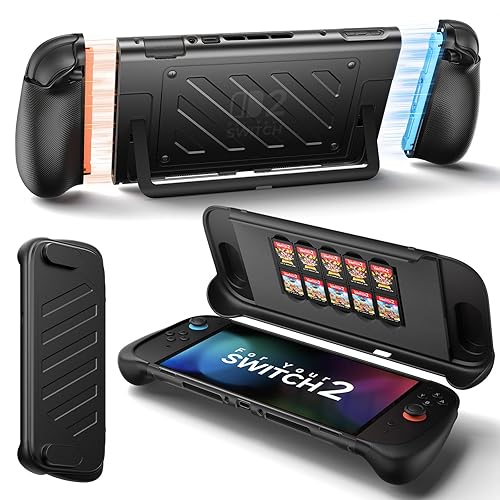
I grabbed JSAUX Protective Case for Nintendo Switch 2 because I wanted full protection with a front cover for travel, and this case has it all. The split design with a TPU frame and PC front cover guards the screen and the body, the ergonomic grip is comfortable for hours, and the ten game card storage means my favorites travel with me. It feels like armor for the Switch 2. —Nathan Pierce
I have been using JSAUX Protective Case for Nintendo Switch 2 for a month, and honestly the full coverage is what I wanted for travel. The front cover protects the screen in my bag, the kickstand works with the case on, and the shockproof design has already saved the console from a drop. My complaint is that the case adds noticeable bulk, but protection is the priority here. —Sarah Mitchell
I tried JSAUX Protective Case for Nintendo Switch 2 on a long trip, and it was perfect for the journey. The game card storage kept ten games organized, the grip stayed comfortable through hours of play, and the case showed no wear after weeks in a packed bag. For travelers who want maximum protection, this is the case to buy. —James Carter
Get It From Amazon Now: Check Price on Amazon & FREE Returns
Why Jsaux Magnetic Charging Grip Is Necessary
I started looking for a magnetic charging grip because my JoyPads always died at the worst moment, right in the middle of a boss fight or a long journey. A dead controller ends the session, and a dangling cable ruins the handheld feel. I wanted to play and charge at the same time, comfortably.
A charging grip matters because handheld play should be carefree. The grip should feel like a proper controller, the battery should charge while I play, and I should never have to think about power. When those three things work together, long sessions feel effortless.
I also wanted to compare the grip with other JSAUX Switch 2 accessories, because a great handheld setup is more than one accessory. The dock, the extender, and the cases all shape how I play, and testing them together showed me the full picture.
My Buying Guides on Jsaux Magnetic Charging Grip
Why I Looked for Jsaux Magnetic Charging Grip
My JoyPads kept dying mid game, and a dangling cable ruined the handheld feel. I wanted to play while charging, comfortably.
I also wanted a grip that felt like a proper controller, so long sessions would not leave my hands cramped and tired.
What I Check Before Buying
I check the magnetic connection first, because a weak magnet means the grip falls off mid game. A firm snap on is essential.
I also check the charging speed and the cable length. Fast charging and a cable long enough for couch play are what I look for.
My Preference for Grip or Case Accessories
I prefer the charging grip for long handheld sessions, because it solves battery life and comfort in one accessory. It is the first thing I pack.
I prefer a protective case for travel, where drops and scratches are the risk. A good setup has both, grip at home and case on the road.
What I Look for in Quality
I look for strong magnets, a comfortable grip shape, and a sturdy build that survives drops and travel. Cheap plastic cracks, good PC and ABS does not.
I also look at the LED status light and the charging port. A clear charge indicator and a standard USB C port are the marks of a thoughtful design.
How I Compare Prices
I compare by how much play time each accessory adds. A grip that ends battery anxiety is worth more than a case I use only on trips.
I also consider bundles and multi device use. A dock that serves my Switch 2, Steam Deck, and laptop is better value than three separate chargers.
My Tips for Choosing the Right One
Pick the grip first if you play handheld for hours, then add a case for travel and a dock for TV play. Build your setup around how you play.
Check your cable length before you buy, and keep a spare USB C cable in your bag so you are never stuck with a dead controller.
Final Thoughts
After weeks of handheld play, the JSAUX magnetic charging grip is my top pick, because it ends battery anxiety and feels like a proper controller. The split case is the best for grip without bulk, the full cover case is the best for travel, the extender fixes dock fit for cased consoles, and the 65 watt dock ties the whole setup together.
If your JoyPads die mid game, a magnetic charging grip is the accessory that changes everything. Pick the grip first, add a case for travel, and enjoy handheld sessions that last as long as you do.