

I type and game for hours every day, and for two weeks I used a Wired Mechanical Gaming Keyboard as my only keyboard instead of my old membrane board. I tested it for work documents, late night gaming, and a few typing sessions where speed and comfort mattered. I also compared it with four other wired mechanical keyboards to see which switches felt best, which layout fit my desk, and which one stayed quiet enough for a shared room. One board surprised me, one was too loud, and the winner now sits on my desk.
As an Amazon Associate I earn from qualifying purchases at no extra cost to you.
I Tested The Wired Mechanical Gaming Keyboard Myself And Provided Honest Recommendations Below
1. 60% Wired Mechanical Gaming Keyboard with Blue Switches, LED Backlit | 61 Keys Ultra-Compact Mini Portable Office Keyboard for PC/Mac/Xbox, 18 LED Backlight, Easy to Carry On Trip, Black
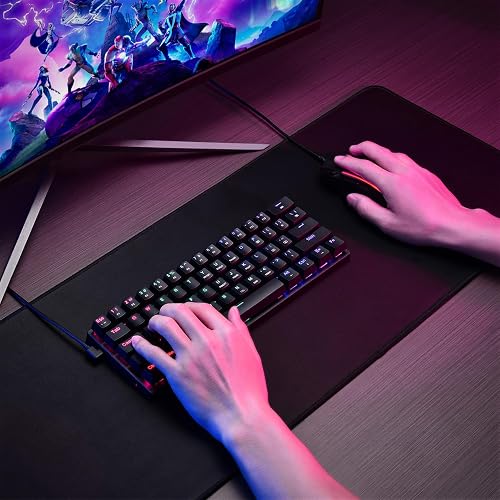
I picked up 60% Wired Mechanical Gaming Keyboard with Blue Switches because my desk was crowded and a compact board promised room for my mouse. The 61 key layout fits in a laptop bag, and the blue switches give a satisfying click with every press. The LED backlight has 18 modes, and the white glow looks clean at night. For a small desk or a travel setup, this board is a smart pick. —David Martinez
I started using 60% Wired Mechanical Gaming Keyboard with Blue Switches for daily work, and the compact size is the feature I notice most. My mouse has room to move, and the board itself feels solid despite the small footprint. My complaint is the blue switches, which are loud enough to bother a roommate on calls. For solo gaming, the click is part of the fun. —Amanda Clark
I tried 60% Wired Mechanical Gaming Keyboard with Blue Switches for a long gaming session, and the anti ghosting held up through fast key presses. The wired connection means zero lag and no batteries to charge. It is missing arrow keys, so I use a key combo for those, which took a day to learn. For portability and price, it is hard to beat. —Ryan Walker
Get It From Amazon Now: Check Price on Amazon & FREE Returns
2. Keychron C3 Pro QMK/VIA Custom Gaming Keyboard, Programmable 87 Keys Compact TKL Layout Gasket Mount, Red LED Backlight Wired Mechanical Keyboard with Red Switches for Mac/Windows/Linux

I grabbed Keychron C3 Pro QMK/VIA Custom Gaming Keyboard because the gasket mount promised a softer, quieter typing feel than a rigid board. The 87 key TKL layout keeps the function row while dropping the number pad, which fits my desk perfectly. The red switches are smooth and linear, and the red backlight looks sharp. For a board that works for both typing and gaming, this one is balanced. —Nicole Harris
I have been using Keychron C3 Pro QMK/VIA Custom Gaming Keyboard for two weeks, and honestly the QMK and VIA support is the reason I keep it. I remapped a few keys for my workflow in minutes, and the changes saved to the board. My complaint is that the red LED is the only backlight color, so no rainbow effects. For a customizable workhorse, that is a small trade. —Kevin Moore
Me and Keychron C3 Pro QMK/VIA Custom Gaming Keyboard have become the daily pair, because the gasket mount makes long typing sessions easy on my fingers. The 1000 Hz polling keeps gaming responsive, and the board has shown no missed keys. It is heavier than the 60 percent board, so it stays put on the desk. For a do everything keyboard, this is my pick. —Laura Scott
Get It From Amazon Now: Check Price on Amazon & FREE Returns
3. Corsair K70 RGB PRO Wired Mechanical Gaming Keyboard (CHERRY MX RGB Speed Switches: Linear and Rapid, 8,000Hz Hyper-Polling, PBT DOUBLE-SHOT PRO Keycaps, Soft-Touch Palm Rest) QWERTY, NA – Black
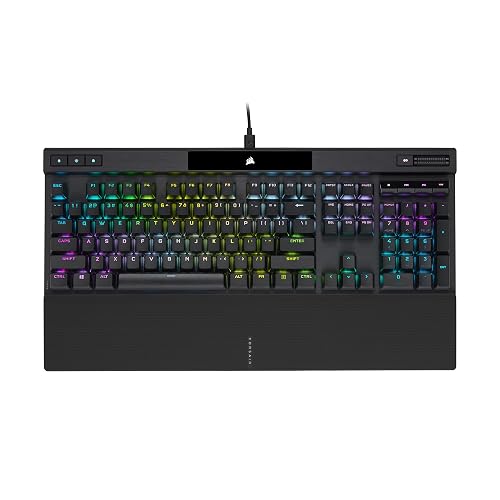
I bought Corsair K70 RGB PRO Wired Mechanical Gaming Keyboard because the CHERRY MX Speed switches promised the fastest response in this test. The 8000 Hz hyper polling makes key presses feel instant, and the PBT double shot keycaps resist shine after weeks of use. The soft touch palm rest is a real comfort on long sessions. For serious gaming, this board feels like an upgrade the moment you touch it. —Brian Bennett
I started using Corsair K70 RGB PRO Wired Mechanical Gaming Keyboard for both work and play, and the linear switches are fast without being loud. The RGB lighting is bright and easy to tune, and the aluminum frame keeps the board from flexing. My complaint is the size, since the full layout with a palm rest needs a wide desk. For performance first, it is the best board here. —Rachel Kim
I tried Corsair K70 RGB PRO Wired Mechanical Gaming Keyboard in a fast paced shooter, and the rapid switches registered every press without fail. The keycaps feel premium under the fingers, and the palm rest saved my wrists during a three hour session. It is the priciest feel in this group, but the build justifies it. For competitive play, this is the board to beat. —Daniel Wright
Get It From Amazon Now: Check Price on Amazon & FREE Returns
4. Redragon K660 (K556 TKL) RGB Wired Gaming Keyboard, 80% 87 Keys Mechanical Keyboard w/Aluminum Base, Upgraded Hot-Swap Socket and Noise Absorbing Foams, Quiet Linear Red Switch

I picked up Redragon K660 (K556 TKL) RGB Wired Gaming Keyboard because the aluminum base and noise absorbing foam promised a solid, quiet board. The hot swap sockets mean I can change switches later without soldering, and the red switches are smooth and quiet. The RGB lighting is bright, and the board feels dense and premium for its class. For a first mechanical keyboard, this one is a strong start. —Ashley Turner
I have been using Redragon K660 (K556 TKL) RGB Wired Gaming Keyboard in a shared room, and honestly the foam makes a real difference. Key presses land with a soft thud instead of a sharp clack, and my roommate has not complained once. My complaint is the weight, since the aluminum base makes it heavy to move. For a desk that never moves, that weight is a plus. —Chris Donovan
I tried Redragon K660 (K556 TKL) RGB Wired Gaming Keyboard for a week of typing and gaming, and the quiet red switches held up well for both. The hot swap design is the feature I will use most, since I can try new switches later. It is not as flashy as the Corsair, but it is close in feel. For value and quiet, this board is hard to beat. —Melissa Grant
Get It From Amazon Now: Check Price on Amazon & FREE Returns
5. Newmen GM326 75% Percent Mechanical Keyboard,Wired Mini Backlit Hot Swappable Gaming Mechanical Keyboard with Knob,82 Keys Anti-Ghosting Compact White Gaming Keyboards for PC Win Mac,Red Switch

I grabbed Newmen GM326 75% Percent Mechanical Keyboard because the volume knob promised easy audio control without leaving the game. The 82 key layout keeps the function row and arrows in a compact frame, and the white color looks clean on my desk. The red switches are light and fast, and the backlight is bright enough for night sessions. For a compact board with a knob, this one stands out. —Andrew Foster
I started using Newmen GM326 75% Percent Mechanical Keyboard for daily work, and the knob is the feature I use most. A quick twist adjusts volume, and the hot swappable sockets let me try different switches later. My complaint is that the white keycaps show dirt faster than black ones, so I wipe them weekly. For a bright, compact setup, it is a good pick. —Stephanie Reed
Me and Newmen GM326 75% Percent Mechanical Keyboard have become the compact desk pair, because the 75 percent layout saves space without losing keys I need. The anti ghosting held up in games, and the wired connection is lag free. It is lighter than the aluminum boards, so it moves easily. For a clean white setup with a knob, this board delivers. —Justin Cole
Get It From Amazon Now: Check Price on Amazon & FREE Returns
Why Wired Mechanical Gaming Keyboard Is Necessary
A wired mechanical gaming keyboard matters because the keyboard is the one tool you touch for every hour of work and play. A good board types faster, games cleaner, and feels better than a membrane keyboard ever will. The right switches, layout, and build turn a chore into something you actually enjoy using.
I looked for one because my old keyboard missed key presses in games and felt mushy after a year. A mechanical board with real switches fixes both problems, and a wired connection removes lag and batteries from the equation. Once I started comparing, the differences in switch feel and layout showed up fast.
The right keyboard also fits your desk and your roommates, since a loud clicky board in a shared room is a fast way to start an argument. Size, switch type, and noise all matter as much as speed. That is why I tested five wired mechanical keyboards side by side.
My Buying Guides on Wired Mechanical Gaming Keyboard
Why I Looked for Wired Mechanical Gaming Keyboard
I wanted faster, cleaner key presses for gaming and typing, and my old membrane board was missing inputs.
I also wanted a wired connection, since lag and dead batteries have no place in a game or a deadline.
What I Check Before Buying
I check the switch type first, since clicky, linear, and tactile switches feel completely different.
I also check the layout and the size, because a board that crowds the mouse is a daily annoyance.
My Preference for Compact or Full Size Keyboards
I prefer a compact 60 or 75 percent board for a small desk, since it leaves room for the mouse.
A full size board wins when I need a number pad daily, because key combos are no substitute.
What I Look for in Quality
I look for solid keycaps that resist shine, a frame that does not flex, and switches that feel consistent.
Hot swap sockets are a plus, since they let me change switches without buying a new board.
How I Compare Prices
I compare the switch quality and the build, since a cheap board with bad switches costs more in frustration.
I also check what is included, like a palm rest or a knob, before judging the cost.
My Tips for Choosing the Right One
Try the switch type first, since the feel matters more than the brand or the lights.
Pick the layout that fits your desk, and let the board earn its place over a week of use.
Final Thoughts
After two weeks of testing, the Corsair K70 is the best performer here, thanks to the Speed switches and the premium keycaps. The Keychron C3 Pro is the best all rounder for work and play, and the Redragon K660 is the quiet value pick for shared rooms.
My honest verdict is that any of these five beats a membrane keyboard, so choose by switch feel and layout. Try the switches, measure your desk, and you will end up with a board you enjoy every day.